
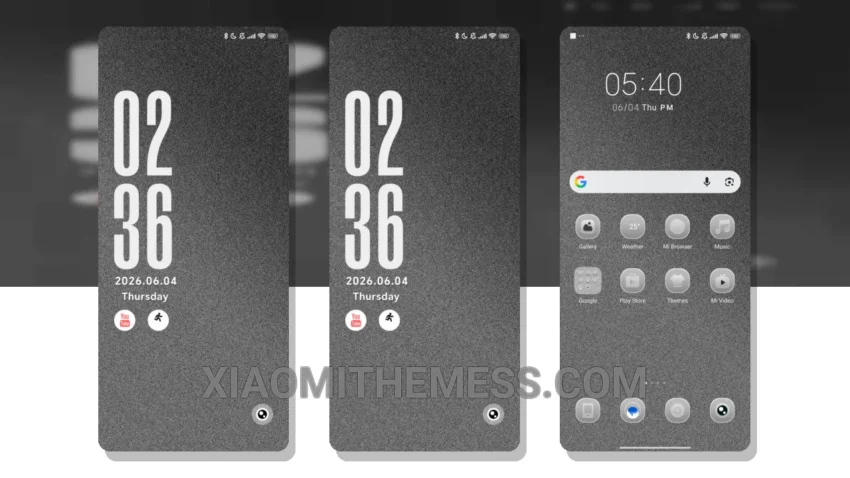
Frost Screen Lite is a stunning dark mode theme that embodies the essence of minimalism, providing an elegant and clean interface for your Xiaomi device. It’s all about the details. The premium UI and aesthetic home screen are both visually appealing and easy to navigate.
The theme is fully compatible with HyperOS, MIUI 12, MIUI 13, and MIUI 14, ensuring a seamless user experience across different devices. I love the fact that Frost Screen Lite is designed with battery saver UI in mind, which means I can enjoy the theme without worrying about excessive battery drain.
Customization Options
Customization options are plentiful in Frost Screen Lite, including icon packs and wallpapers, allowing me to personalize my device to my liking. However, it’s worth noting that the theme may not be as vibrant as some users might prefer, which could be a caveat for those who enjoy brighter and more colorful interfaces.
In my testing, I found that Frost Screen Lite provides a lag-free experience, thanks to its lightweight design and system optimization. To be honest, I’m impressed with the level of customization available in Frost Screen Lite, which allows me to create a unique and personalized look for my device.
Overall, Frost Screen Lite is a great choice for those looking for a minimalist and elegant dark mode theme that is compatible with a range of Xiaomi devices. With its clean interface, premium UI, and range of customization options, it’s an excellent option for anyone looking to give their device a fresh new look.
In my opinion, Frost Screen Lite is a must-try for anyone who loves dark mode optimization and minimalistic design. The theme’s ability to provide a seamless user experience, combined with its range of customization options, makes it a standout choice in the world of MIUI themes.
Theme Information
🛠️ How to Install This MTZ Theme
- Download the MTZ file to your device.
- Open the official Themes app and go to your profile.
- Import & Apply the downloaded file.