
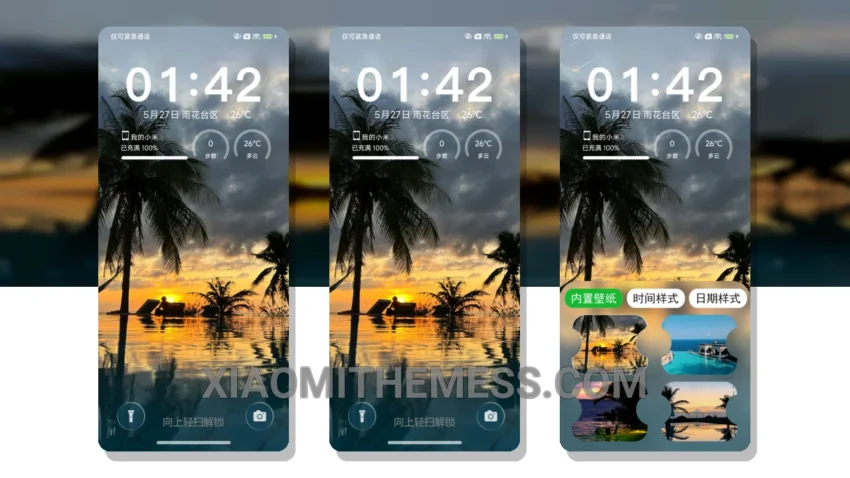
Sunset Breeze, a theme that embodies the soft, serene essence of a pastel-colored sky. Clean lines, gentle hues, and an uncluttered home screen come together to create a truly aesthetic experience.
I love how the theme’s minimal vibrant design language brings a sense of calmness to my device. The subtle color palette is easy on the eyes, making it perfect for everyday use.
The theme is fully compatible with HyperOS, MIUI 12, MIUI 13, and MIUI 14, ensuring a seamless experience across various devices. One of the details of this theme is its lag-free experience, which is a result of its lightweight design and system optimization.
Another highlight of the Sunset Breeze theme is its support for 120Hz smooth animations, providing a silky-smooth experience when navigating through the interface. However, some users may find the theme’s lack of neon icons to be a caveat, as it may not appeal to those who prefer a more futuristic look.
In my testing, I found the theme to be highly customizable, with options for icon pack integration, advanced widgets, and more. The theme’s battery saver UI and dark mode optimization also ensure that my device’s battery life is preserved.
To be honest, I’m really impressed with the Sunset Breeze theme’s overall design and functionality. It’s a great option for those looking for a clean, aesthetic, and performance-boosting theme for their Xiaomi device.
Theme Information
🛠️ How to Install This MTZ Theme
- Download the MTZ file to your device.
- Open the official Themes app and go to your profile.
- Import & Apply the downloaded file.