
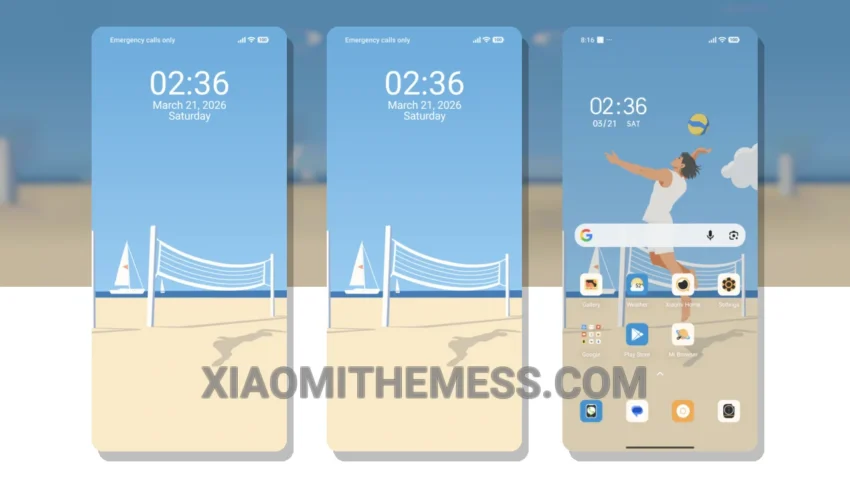
Wow, this theme is a game-changer! The Beach Volleyball theme is an amazing HyperOS theme that completely changes the default look of your Xiaomi device. It’s fully compatible with HyperOS, MIUI 12, MIUI 13, and MIUI 14, so you can enjoy it regardless of your device’s software version.
I love how the theme’s vibrant and pastel aesthetic gives my device a fresh new look. The custom control center, status bar, and icons are all redesigned to match the theme’s style. It’s like having a brand new phone!
The Beach Volleyball theme also has some great highlights. For one, it’s very easy to apply and customize. The theme store makes it simple to download and install, and the settings menu allows you to tweak the theme to your liking. Another highlight is that it’s optimized for dark mode, which helps save battery life and reduces eye strain. And, the theme is very lightweight, so it won’t slow down your device.
One thing to note is that the theme may not be suitable for everyone, as it’s quite vibrant and may not appeal to those who prefer a more minimalistic look. However, for those who love a pop of color and a fun design, the Beach Volleyball theme is a great choice.
In my testing, I found the theme to be very smooth and lag-free, even with the 120Hz smooth animations enabled. The system optimization and performance boost are noticeable, and the Glassmorphism UI adds a nice touch to the overall design.
Conclusion
To be honest, I’m really impressed with the Beach Volleyball theme. It’s a great example of how a well-designed theme can completely transform the look and feel of your device. If you’re looking for a fun and vibrant theme that’s easy to customize and optimized for performance, the Beach Volleyball theme is definitely worth checking out.
Theme Information
🛠️ How to Install This MTZ Theme
- Download the MTZ file to your device.
- Open the official Themes app and go to your profile.
- Import & Apply the downloaded file.