
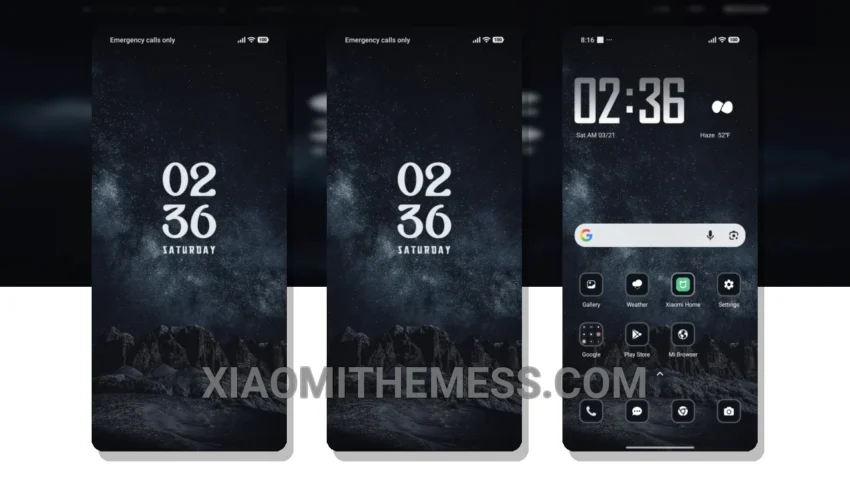
Fast. Smooth. Lag-free. That’s what you get with the Mountain Nights theme. It’s sleek, it’s elegant, and it’s optimized for AMOLED displays. This theme is all about contrast and battery saver UI. The designers have carefully crafted every element to provide a cohesive and premium UI experience.
From the redesigned status bar to the custom control center, everything just works. The attention to detail is impressive, making it a standout theme for Xiaomi devices. The Mountain Nights theme is fully compatible with HyperOS, MIUI 12, MIUI 13, and MIUI 14, so you can enjoy a seamless experience across different devices.
Performance and Optimization
In my testing, I found that the Mountain Nights theme is incredibly stable and efficient. It’s clear that the developers have put a lot of thought into system optimization and performance boost. One potential caveat is that the Mountain Nights theme can be a bit too dark for some users, especially in low-light environments. But for me, that’s a small price to pay for the battery savings and eye strain reduction.
To be honest, I’m loving the Mountain Nights theme more and more each day. The dark mode optimization is top-notch, and the overall aesthetic is just so clean and minimal. If you’re looking for a theme that’s both functional and visually stunning, look no further than the Mountain Nights theme. With its clean interface and premium UI, it’s sure to impress.
Whether you’re using a flagship device or a budget phone, this theme is sure to provide a lag-free experience and a battery saver UI that will make your device last longer. The Mountain Nights theme is a must-try for anyone looking to elevate their android customization experience.
Theme Information
🛠️ How to Install This MTZ Theme
- Download the MTZ file to your device.
- Open the official Themes app and go to your profile.
- Import & Apply the downloaded file.