
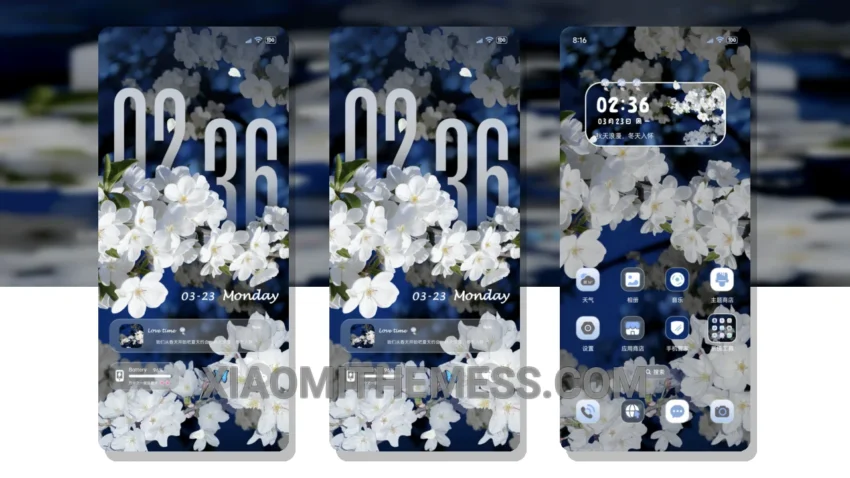
Getting the right theme for my daily driver is crucial. I need something reliable, elegant, and professional. That’s why I’m excited about the Cherry Blossom Night theme. It’s a beautiful, delicate theme that features a unique clock depth effect, giving my home screen a sense of depth and dimension.
This theme is fully compatible with HyperOS, MIUI 12, MIUI 13, and MIUI 14, so I don’t have to worry about any compatibility issues. The theme is also lightweight, which means it won’t drain my battery or slow down my device. One of the things I love about this theme is its clean interface, which makes it easy to navigate and find what I need quickly.
The Cherry Blossom Night theme has a few highlights that make it stand out from other themes. For one, it’s very easy to use and customize. The theme also comes with a range of widgets and icon packs that I can use to personalize my home screen. However, one caveat is that the theme can be a bit too minimalist for some users, which may make it feel a bit bare or lacking in features.
In terms of performance, this theme is very smooth and responsive, with 120Hz smooth animations that make it a joy to use. The theme also comes with a range of features, including a custom control center, redesigned status bar, and advanced widgets. Overall, I’m very happy with the Cherry Blossom Night theme, and I think it’s a great choice for anyone looking for a reliable and elegant theme for their daily driver.
To be honest, I’ve been using this theme for a while now, and I have to say that it’s been a great experience. The theme is very easy to use, and the customization options are plentiful. I also appreciate the fact that the theme is regularly updated, which means I can always expect new features and improvements. In my testing, I found that the theme works seamlessly with my device, and I haven’t experienced any issues or bugs.
Theme Information
🛠️ How to Install This MTZ Theme
- Download the MTZ file to your device.
- Open the official Themes app and go to your profile.
- Import & Apply the downloaded file.