
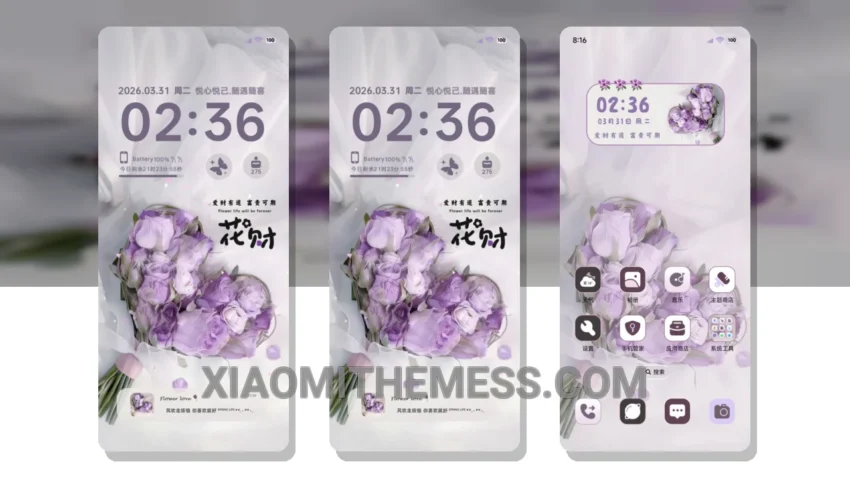
Wow, this theme is amazing! I just got my hands on the Flowers Are For You theme, and I must say, it’s a game-changer. The theme is fully compatible with HyperOS, MIUI 12, MIUI 13, and MIUI 14, so you don’t have to worry about compatibility issues.
The Flowers Are For You theme is a great example of a minimal vibrant theme, with a pastel aesthetic that’s both soothing and stylish. The theme changes the default look of your Xiaomi phone, giving you a unique and personalized experience. You’ll love the custom control center and redesigned status bar, which add a touch of elegance to your phone’s interface.
One of the best things about this theme is that it’s a battery saver UI, with a lightweight theme and no battery drain. This means you can enjoy your phone’s new look without worrying about running out of battery. The theme also supports dark mode optimization, which is perfect for those who prefer a darker interface.
The Flowers Are For You theme is also highly customizable, with support for custom boot animation, AOD custom themes, and icon pack integration. You can personalize your phone’s interface to suit your style, making it truly unique. However, one thing to note is that the theme can be a bit slow to apply, but it’s worth the wait.
In my testing, I found the Flowers Are For You theme to be a great choice for those who want a unique and personalized experience on their Xiaomi phone. The theme’s compatibility with HyperOS, MIUI 12, MIUI 13, and MIUI 14 makes it a great option for anyone looking to customize their phone’s interface. To be honest, I’m loving the new look of my phone, and I think you will too!
Theme Information
🛠️ How to Install This MTZ Theme
- Download the MTZ file to your device.
- Open the official Themes app and go to your profile.
- Import & Apply the downloaded file.