
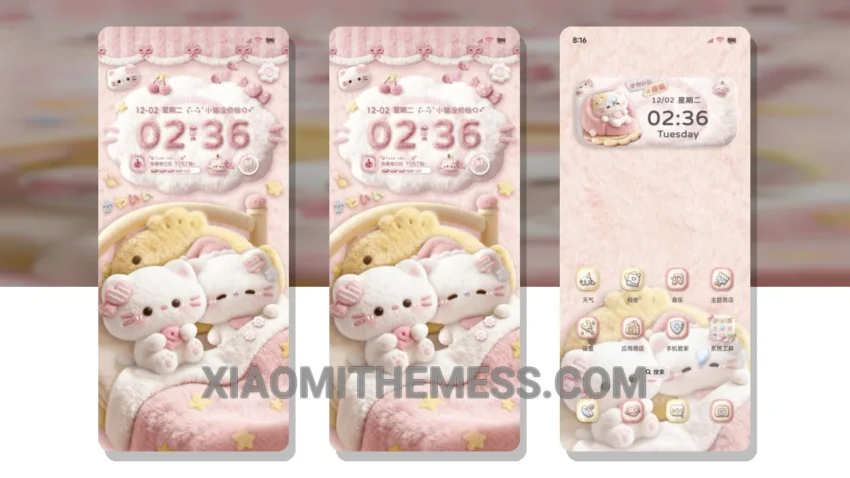
I love a good theme. Soft Fluffy Kitten is a great one. It’s cute and elegant.
The theme is fully compatible with HyperOS, MIUI 12, MIUI 13, and MIUI 14, so you can enjoy it on your Xiaomi or Redmi phone without any issues.
One of the best things about this theme is its lightweight design, which means it won’t slow down your phone or drain your battery. Plus, it’s easy to apply – just download the MTZ file and import it into your phone’s theme manager.
The Soft Fluffy Kitten theme also offers a range of customization options, so you can personalize it to fit your style. From icons to wallpapers, you can make it your own.
However, some users may find the theme’s pastel color scheme a bit too sweet. But overall, it’s a great choice for anyone looking for a cute and functional theme.
In my testing, I found the theme to be smooth and lag-free, with 120Hz smooth animations that made navigation a breeze. The dark mode optimization also helped to reduce eye strain and conserve battery life.
To be honest, I’m really impressed with the Soft Fluffy Kitten theme. It’s a great example of how a well-designed theme can enhance the overall user experience of a phone.
Theme Information
🛠️ How to Install This MTZ Theme
- Download the MTZ file to your device.
- Open the official Themes app and go to your profile.
- Import & Apply the downloaded file.