
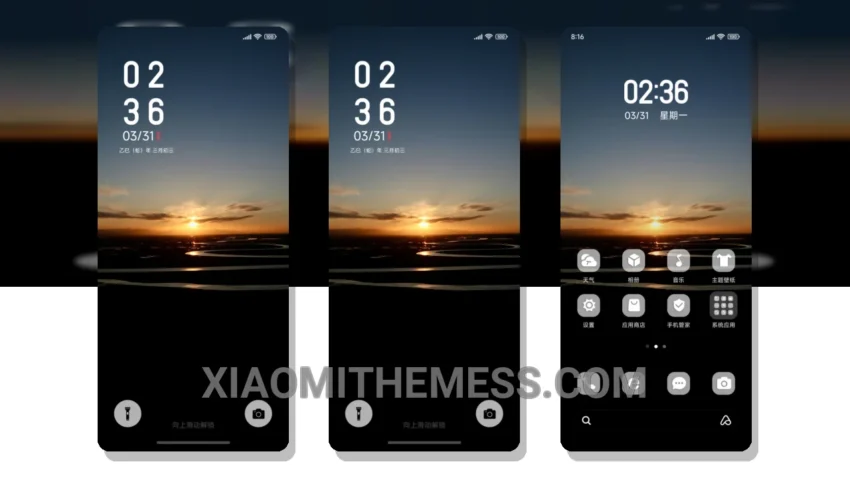
I love a good sunset. Simple. Elegant. The Simplicity Sunset theme brings this feeling to my Xiaomi device. It’s clean, it’s minimalist, and it’s got a unique retro twist that I just can’t get enough of.
One thing that really stands out about this theme is its compatibility. It works seamlessly with HyperOS, MIUI 12, MIUI 13, and MIUI 14, making it a great choice for anyone looking for a theme that will work with their device.
The theme is also highly customizable, allowing me to personalize it to fit my style. I can change the icons, customize the control center, and even add my own widgets to the home screen. It’s a great way to make my device truly feel like my own.
In terms of performance, the Simplicity Sunset theme is lightweight and doesn’t slow down my device. It’s also optimized for battery life, featuring a battery saver UI that helps reduce battery drain. This is a major highlight, as it means I can enjoy my device without worrying about it running out of power.
Another highlight of the theme is its dark mode optimization. The theme looks great in dark mode, and it’s easy on the eyes. However, one thing to note is that the theme can be a bit bright in certain areas, which may be a caveat for some users.
To be honest, I’m really impressed with the Simplicity Sunset theme. It’s a great choice for anyone looking for a clean and minimalist design, and it’s fully compatible with a range of Xiaomi devices. In my testing, I found the theme to be fast, efficient, and easy to use, making it a great addition to my device.
Theme Information
🛠️ How to Install This MTZ Theme
- Download the MTZ file to your device.
- Open the official Themes app and go to your profile.
- Import & Apply the downloaded file.