
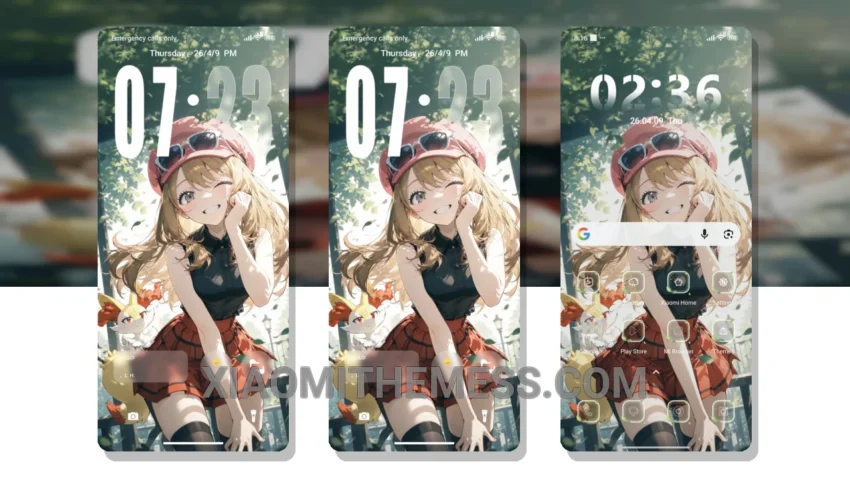
The Spring Girl theme is a beautiful and delicate pastel theme designed for HyperOS and MIUI devices. With its unique twist and elegant design, this theme is perfect for those looking for a clean and aesthetic interface.
One of the standout features of the Spring Girl theme is its pastel aesthetic, which provides a soft and calming visual experience. The theme’s color palette is carefully curated to create a sense of serenity and tranquility, making it perfect for everyday use.
In terms of compatibility, the Spring Girl theme is fully compatible with HyperOS, MIUI 12, MIUI 13, and MIUI 14 devices, ensuring that you can enjoy a seamless and consistent experience across different devices and operating systems.
The Spring Girl theme also offers several highlights, including its lightweight and lag-free design, which ensures a smooth and responsive user experience. Additionally, the theme supports dark mode optimization, providing a battery-friendly experience and reducing eye strain in low-light environments.
However, one potential caveat of the Spring Girl theme is that it may not be suitable for users who prefer a more vibrant and bold visual experience. Nevertheless, for those who appreciate a clean and elegant design, the Spring Girl theme is an excellent choice.
In my testing, I found the Spring Girl theme to be a joy to use, with its intuitive and user-friendly interface making it easy to navigate and customize. To be honest, I was impressed by the theme’s attention to detail and its ability to provide a unique and personalized experience.
Theme Information
🛠️ How to Install This MTZ Theme
- Download the MTZ file to your device.
- Open the official Themes app and go to your profile.
- Import & Apply the downloaded file.