
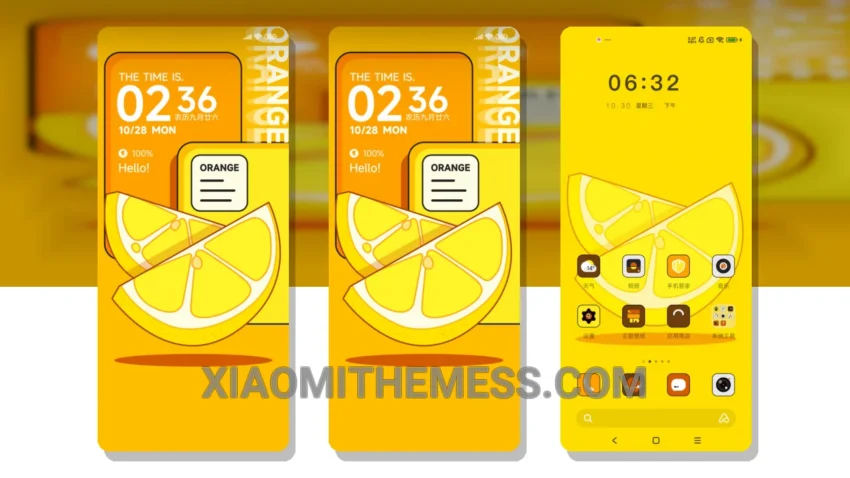
The Orange Encounter Summer theme is a great option for those looking for a elegant and professional UI. It’s fully compatible with HyperOS, MIUI 12, MIUI 13, and MIUI 14, making it a versatile choice for Xiaomi and Redmi phone users.
One of the key details of this theme is its clean interface, which provides an uncluttered and easy-to-use experience. The theme’s design is inspired by the warmth of summer, with a color palette that’s both soothing and vibrant.
In terms of performance, the Orange Encounter Summer theme is lag-free and provides a smooth experience, even on lower-end devices. The theme’s size is 12.76 MB, which is relatively small compared to other themes on the market.
However, some users may find the theme’s customization options to be limited. Despite this, the theme’s overall design and functionality make it a great choice for those looking for a hassle-free experience.
To be honest, I was impressed by the Orange Encounter Summer theme’s overall design and functionality. The theme’s compatibility with HyperOS, MIUI 12, MIUI 13, and MIUI 14 makes it a great option for Xiaomi and Redmi phone users. In my testing, the theme performed well and provided a smooth experience, with no noticeable battery drain or performance issues.
Conclusion
Overall, the Orange Encounter Summer theme is a great choice for those looking for a elegant and professional UI. Its compatibility with HyperOS, MIUI 12, MIUI 13, and MIUI 14, combined with its clean interface and lag-free performance, make it a great option for Xiaomi and Redmi phone users.
Theme Information
🛠️ How to Install This MTZ Theme
- Download the MTZ file to your device.
- Open the official Themes app and go to your profile.
- Import & Apply the downloaded file.