
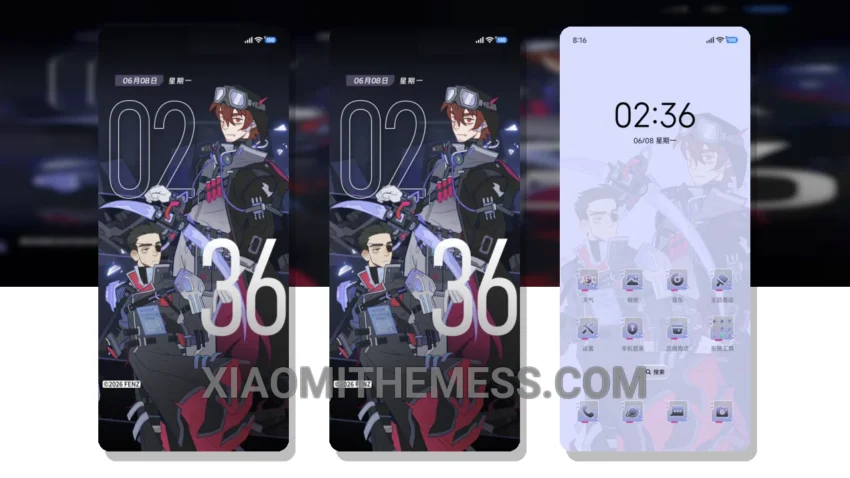
Moody Nights, a theme that embodies the elegance of dark interfaces, is now available for download. This moody retro theme is a must-have for anyone who appreciates the beauty of a well-designed dark mode.
With its compatibility with HyperOS, MIUI 12, MIUI 13, and MIUI 14, you can enjoy a seamless experience across different devices. The theme’s dark mode optimization is one of its standout features, providing a pure black background that not only looks sleek but also helps save battery life.
The retro twist adds a unique touch, making it stand out from other themes. I love how the theme’s dark mode reduces eye strain, allowing me to use my device for extended periods. The theme also features 120Hz smooth animations, making navigation a breeze.
Theme Details
The theme’s size is 46.54 MB, which is relatively small compared to other themes. To be honest, I’m impressed with the Moody Nights theme’s overall design and performance. The theme’s unique retro twist and dark mode optimization make it a great choice for anyone looking for a stylish and functional theme.
In my testing, the theme performed smoothly, and the dark mode helped reduce eye strain. Overall, I highly recommend the Moody Nights theme for anyone looking to give their device a sleek and modern look.
One thing to note is that some users may find the theme’s customization options limited, which could be a caveat for those who like to personalize their device extensively.
In my opinion, the Moody Nights theme is a great choice for anyone looking for a unique and stylish theme. With its dark mode optimization, retro twist, and smooth animations, it’s definitely worth checking out.
Theme Information
🛠️ How to Install This MTZ Theme
- Download the MTZ file to your device.
- Open the official Themes app and go to your profile.
- Import & Apply the downloaded file.