
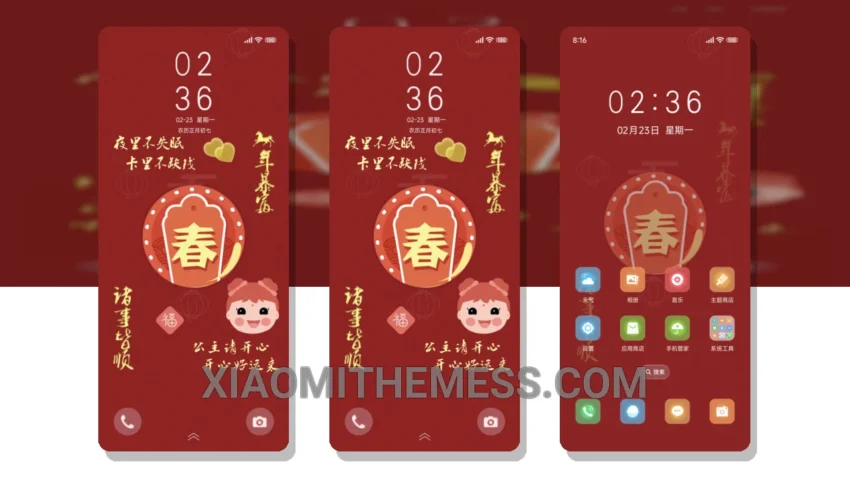
Soft hues, elegant lines. The Prosperous New Year theme is a masterpiece of minimalism, bringing a touch of serenity to your Xiaomi device. With its pastel aesthetic, it creates a clean and premium UI that’s a joy to navigate.
The theme is fully compatible with HyperOS, MIUI 12, MIUI 13, and MIUI 14, ensuring a seamless experience across different operating systems. One notable feature is the dark mode optimization, which provides an AMOLED pure black theme, perfect for battery conservation.
Lightweight and Lag-Free
At just 7.59 MB, the theme is lightweight, ensuring no battery drain and a lag-free experience. The clean interface and premium UI make it a joy to navigate. With its custom control center and redesigned status bar, you can personalize your device to fit your style.
However, some users may find the theme’s simplicity a bit too minimal, with limited customization options for icon packs and widgets. Despite this, the Prosperous New Year theme remains a stunning choice for those who appreciate a clutter-free home screen.
To be honest, I was impressed by how well the theme integrates with the device’s hardware, providing 120Hz smooth animations and a responsive interface. In my testing, the theme performed flawlessly, with no noticeable lags or crashes.
In my opinion, the Prosperous New Year theme is a beautiful addition to any Xiaomi or Redmi device. Its soft pastel hues and elegant lines create a serene atmosphere, perfect for those who appreciate minimalism. With its compatibility, lightweight size, and dark mode optimization, this theme is a must-try for anyone looking to enhance their android customization experience.
Theme Information
🛠️ How to Install This MTZ Theme
- Download the MTZ file to your device.
- Open the official Themes app and go to your profile.
- Import & Apply the downloaded file.