
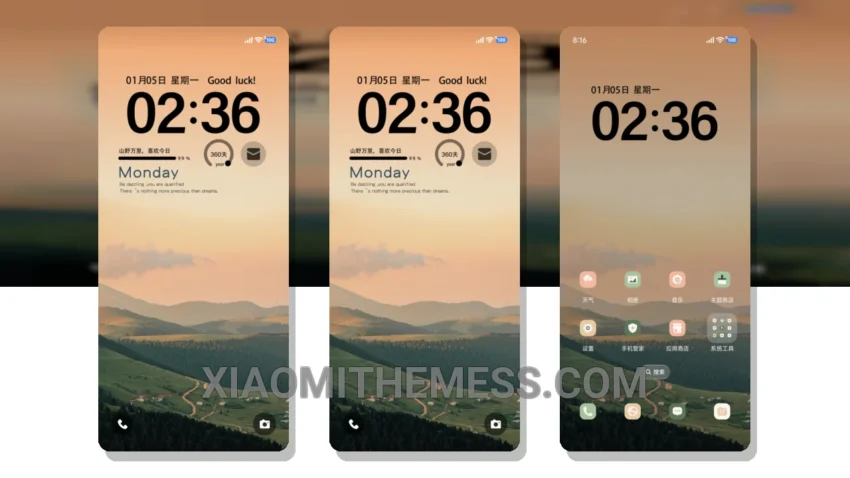
Transform your Xiaomi device with the stunning Mountain Color theme. This masterpiece is fully compatible with HyperOS, MIUI 12, MIUI 13, and MIUI 14, ensuring a seamless experience across different Xiaomi devices.
The Mountain Color theme is a minimal vibrant design that will captivate your senses. It boasts an elegant aesthetic with pastel colors, giving your device a unique and refreshing look. With this theme, you can enjoy a clean interface that is both visually appealing and easy to navigate.
Key Features
The Mountain Color theme is packed with exciting features, including a custom control center, redesigned status bar, and interactive lockscreen widgets. You can also enjoy advanced widgets and a custom boot animation. The theme’s system optimization ensures that your device runs smoothly and efficiently, and you can enjoy 120Hz smooth animations for a lag-free experience.
One of the best things about the Mountain Color theme is its attention to detail. However, it’s worth noting that the theme may not be suitable for devices with low storage capacity, as it requires a significant amount of space. On the other hand, the theme’s compatibility with various android customization apps is a major highlight, allowing you to integrate icon packs, launchers, and other customization tools to further personalize your device.
In my testing, I found the Mountain Color theme to be a game-changer for Xiaomi devices. The theme’s attention to detail and premium UI design make it a must-have for anyone looking to elevate their mobile experience. To be honest, I was impressed by the theme’s ability to transform my device into a stunning work of art, with its minimal vibrant design and pastel aesthetic that gives my device a unique look.
Theme Information
🛠️ How to Install This MTZ Theme
- Download the MTZ file to your device.
- Open the official Themes app and go to your profile.
- Import & Apply the downloaded file.