
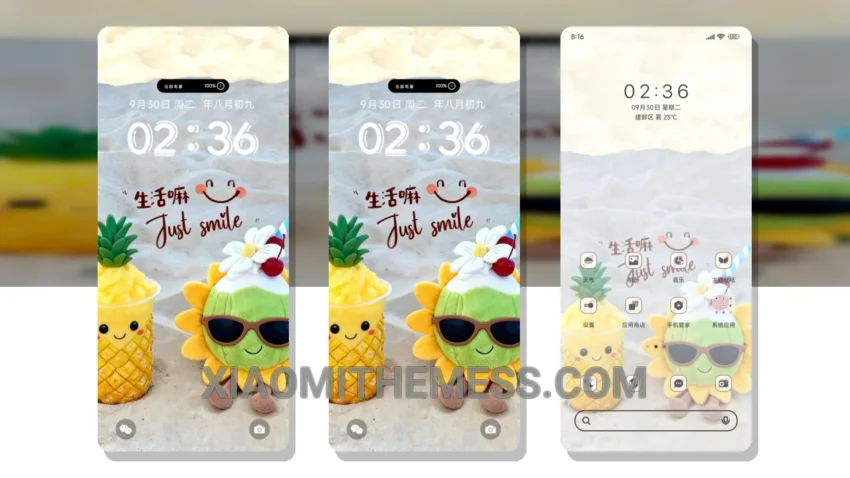
Darkness. Elegance. Pastel aesthetics. The Smile At Everything theme brings it all together in a beautiful, minimal package. This Xiaomi theme is all about subtle sophistication, making it perfect for those who want a professional look without sacrificing style.
It’s fully compatible with HyperOS, MIUI 12, MIUI 13, and MIUI 14, so you can enjoy it on a wide range of Xiaomi devices. The design is lightweight, which means you get a lag-free experience and system optimization that helps reduce battery drain.
Customization Options
The Smile At Everything theme offers a range of customization options, including icon pack integration, custom control center, and redesigned status bar. These features let you personalize your device to suit your preferences, making it a great option for those who value customization.
One thing to note is that the Smile At Everything theme may not be suitable for those who prefer a more vibrant and colorful interface. The pastel aesthetic, while elegant, may be too subtle for some users.
In my testing, I found the Smile At Everything theme to be a great option for those who want a reliable and elegant interface. The theme’s minimal design and pastel aesthetics make it perfect for daily use, and its compatibility with various Xiaomi devices makes it a versatile option.
To be honest, I’m impressed with the Smile At Everything theme. It’s a great choice for anyone who wants a beautiful, pastel aesthetic theme that’s also lightweight and optimized for dark mode.
Theme Information
🛠️ How to Install This MTZ Theme
- Download the MTZ file to your device.
- Open the official Themes app and go to your profile.
- Import & Apply the downloaded file.