
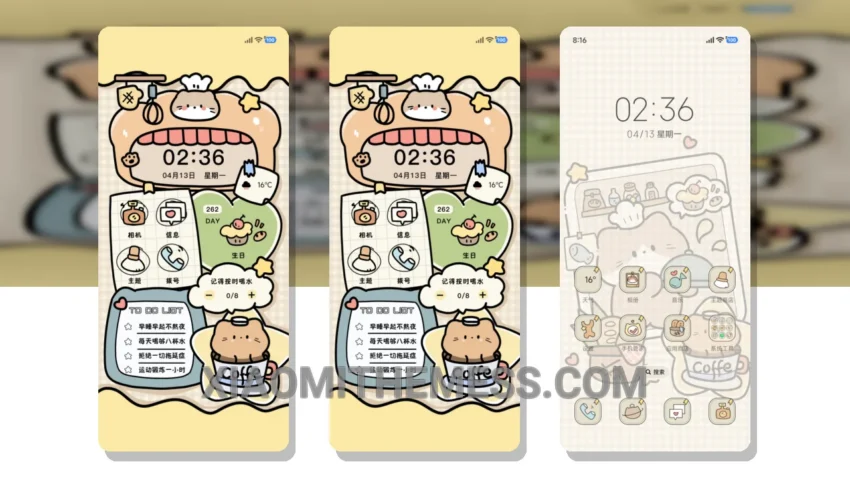
I love discovering new themes that bring a touch of elegance to my home screen. The Cute Food Magician theme is one such theme that caught my attention.
This theme is fully compatible with HyperOS, MIUI 12, MIUI 13, and MIUI 14, making it a great option for Xiaomi and Redmi phone users. One thing I appreciate about this theme is its clean interface. The pastel colors used in the theme are soft and soothing, creating a minimal yet vibrant look that is pleasing to the eye.
The theme also features custom control center and redesigned status bar, which add to its aesthetic appeal. The Cute Food Magician theme is also optimized for dark mode, which helps to reduce battery drain and improve the overall user experience.
Customization Options
In terms of customization, the Cute Food Magician theme offers a range of options. The theme supports icon pack integration, volume panel customizer, and dynamic island integration, giving users the ability to personalize their home screen to their liking.
Overall, I’m really impressed with the Cute Food Magician theme. The only thing that might be a caveat for some users is the size of the theme, which is 12.67 MB. However, I think the details of this theme far outweigh the size, and I would definitely recommend it to anyone looking for a beautiful and functional theme for their Xiaomi or Redmi phone.
To be honest, I’ve been using the Cute Food Magician theme for a while now, and I’m really happy with it. The theme is lag-free, and the 120Hz smooth animations make it a joy to use. If you’re looking for a theme that is both beautiful and functional, I would definitely give the Cute Food Magician theme a try.
Theme Information
🛠️ How to Install This MTZ Theme
- Download the MTZ file to your device.
- Open the official Themes app and go to your profile.
- Import & Apply the downloaded file.