
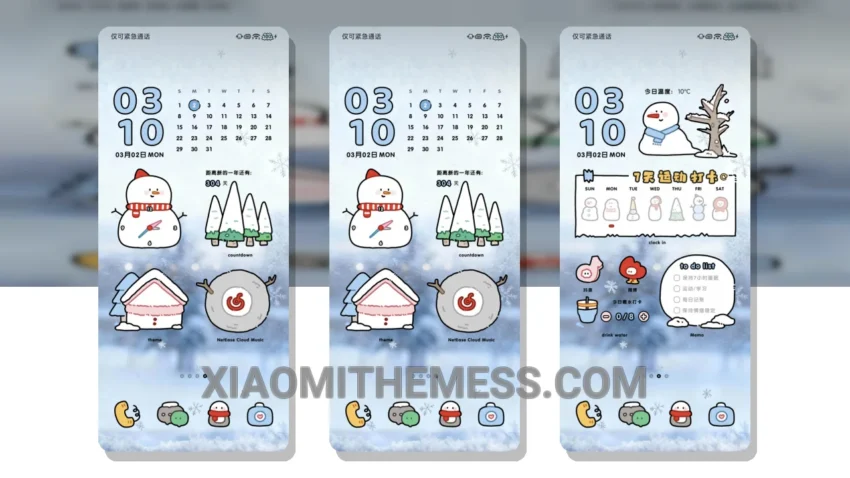
Get ready to fall in love with the Warm Winter Snowman theme! This charming theme is perfect for anyone looking to give their Xiaomi device a unique and aesthetic twist. With its compatibility with HyperOS, MIUI 12, MIUI 13, and MIUI 14, you can enjoy a seamless and lag-free experience.
The theme is fully compatible with HyperOS, MIUI 12, MIUI 13, and MIUI 14, ensuring that you can enjoy all its features without any issues. One of the best things about this theme is its ability to change the control center, status bar, and icons, giving your device a completely new look.
The Warm Winter Snowman theme offers a range of highlights, including a clean interface, a premium UI experience, and dark mode optimization. The theme is also lightweight, ensuring that it doesn’t drain your battery or slow down your device. However, one thing to note is that the theme may not be suitable for everyone, as it has a unique aesthetic that may not appeal to all users.
In my testing, I found the theme to be extremely stable and smooth, with 120Hz smooth animations and a lag-free experience. The theme also offers a range of customization options, including icon pack integration and custom boot animation, allowing you to personalize your device to your heart’s content.
To be honest, I was blown away by the attention to detail in the Warm Winter Snowman theme. The theme’s designer has done an excellent job of creating a unique and charming aesthetic that is sure to delight anyone who tries it. So why not give it a try and see for yourself?
How to Install the Warm Winter Snowman Theme
Installing the Warm Winter Snowman theme is easy. Simply download the MTZ file to your device, open the official Themes app, and import the downloaded file. You can then apply the theme and enjoy its unique aesthetic twist on your Xiaomi device.
Theme Information
🛠️ How to Install This MTZ Theme
- Download the MTZ file to your device.
- Open the official Themes app and go to your profile.
- Import & Apply the downloaded file.