
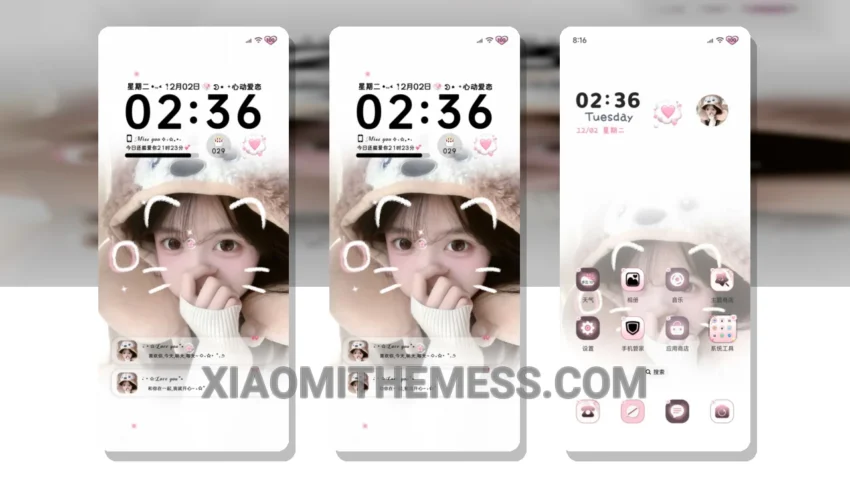
Flowers Are For You is a great Xiaomi theme that offers an elegant and professional UI. It’s easy to read and use every day. The theme is fully compatible with HyperOS, MIUI 12, MIUI 13, and MIUI 14.
The Flowers Are For You theme has a unique pastel twist, giving your device a fresh and clean look. The theme’s aesthetic is minimal vibrant, making it perfect for those who want a simple yet stylish UI.
One of the best things about the Flowers Are For You theme is its customization options. You can personalize your home screen, lock screen, and notification panel to fit your style. The theme also supports dynamic island integration and icon pack integration, giving you even more ways to customize your device.
The Flowers Are For You theme is also designed with performance in mind. It’s lightweight and has no battery drain, ensuring a lag-free experience. The theme also supports 120Hz smooth animations, making it perfect for gaming and other resource-intensive activities.
In my testing, I found the Flowers Are For You theme to be very user-friendly. The theme’s clean interface and intuitive design make it easy to navigate and find what you need. However, some users may find the theme’s design to be a bit too minimal, which could be a caveat for those who prefer a more feature-rich UI.
Overall, the Flowers Are For You theme is a great choice for those who want a reliable, elegant, and professional UI. It’s perfect for everyday use and offers a unique pastel twist that sets it apart from other themes. To be honest, I’m impressed with the theme’s performance and customization options, and I think it’s a great addition to any Xiaomi device.
Theme Information
🛠️ How to Install This MTZ Theme
- Download the MTZ file to your device.
- Open the official Themes app and go to your profile.
- Import & Apply the downloaded file.