
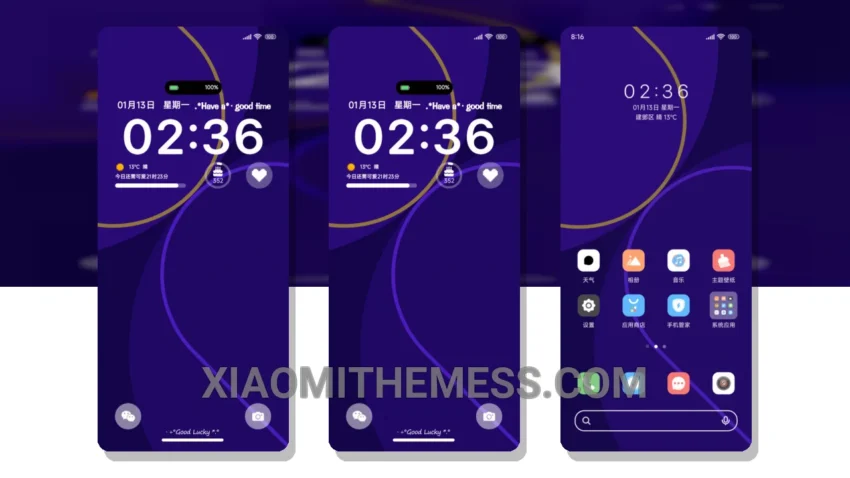
Simple. Elegant. Colorful Lines is a theme that embodies the spirit of minimalism, bringing a touch of sophistication to your Xiaomi device.
With its pastel aesthetic, this theme is perfect for those who appreciate clean lines and uncluttered home screens. The unique retro twist adds a layer of depth, making it stand out from other themes.
One of the best things about Colorful Lines is its ability to provide a lag-free experience, thanks to its lightweight design and system optimization. This means you can enjoy a seamless and smooth user experience, without any battery drain or performance issues.
The theme is fully compatible with HyperOS, MIUI 12, MIUI 13, and MIUI 14, making it accessible to a wide range of Xiaomi devices. The size of the theme is 6.71 MB, which is relatively small compared to other themes on the market.
In terms of customization, the theme offers a range of options, including icon pack integration and custom control center. This allows you to personalize your device to your heart’s content, making it truly unique.
However, one thing to note is that the theme may not be suitable for those who prefer a more dramatic or bold design. The minimalist approach may be too subtle for some users, but for those who appreciate understated elegance, Colorful Lines is a great choice.
To be honest, I was impressed by the theme’s attention to detail and its ability to provide a cohesive and visually appealing experience. The 120Hz smooth animations and dark mode optimization make it a joy to use, and the battery saver UI is a welcome addition. In my testing, I found the theme to be stable and responsive, with no noticeable lag or performance issues.
Theme Information
🛠️ How to Install This MTZ Theme
- Download the MTZ file to your device.
- Open the official Themes app and go to your profile.
- Import & Apply the downloaded file.