
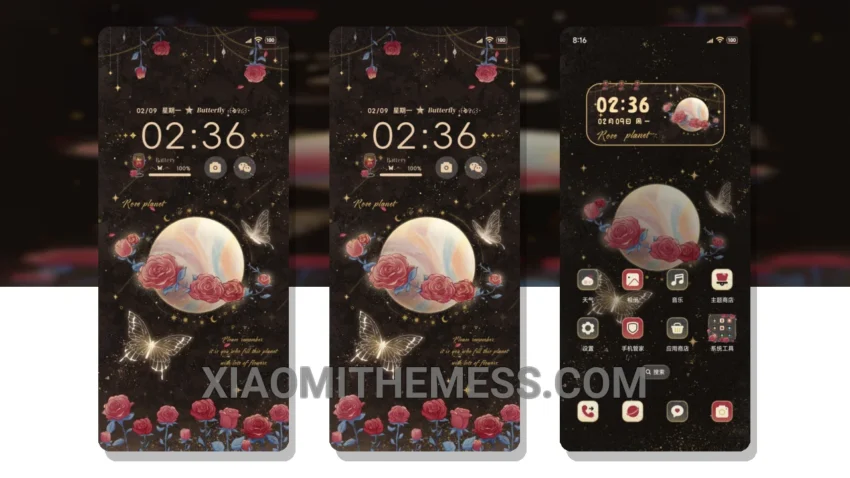
I love deep themes that change the control center, status bar, and icons. The Romantic Retro Rose Planet theme is one such theme that caught my attention. It’s a great theme that gives your device a unique pastel aesthetic look.
The theme is fully compatible with HyperOS, MIUI 12, MIUI 13, and MIUI 14, so you don’t have to worry about compatibility issues. One of the best things about this theme is its custom control center, which gives you a unique way to control your device.
Key Features
The theme also comes with a redesigned status bar that complements the pastel aesthetic look. The icons are also custom-designed to match the theme’s color scheme. I like how the theme’s minimal vibrant design makes my device look clean and stylish.
In terms of performance, the theme is lightweight and doesn’t cause any battery drain issues. It’s also compatible with other android customization apps, including icon pack integration and launcher apps. However, one thing to note is that the theme may not be suitable for devices with low storage space, as it requires a significant amount of storage to install.
To be honest, I’m really impressed with the Romantic Retro Rose Planet theme. It’s a great way to give your device a unique look and feel. The theme’s pastel aesthetic design is really eye-catching, and I love how it changes the overall look of my device.
In my testing, the Romantic Retro Rose Planet theme has been a great experience. I love how it gives my device a unique look and feel, and the custom control center and status bar are really useful. If you’re looking for a great theme that’s compatible with HyperOS and MIUI, I would definitely recommend the Romantic Retro Rose Planet theme.
Theme Information
🛠️ How to Install This MTZ Theme
- Download the MTZ file to your device.
- Open the official Themes app and go to your profile.
- Import & Apply the downloaded file.