
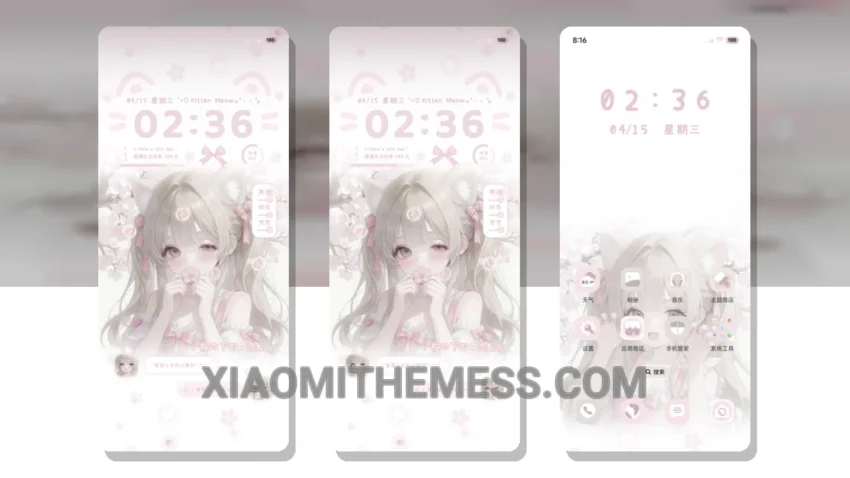
Get ready to transform your Xiaomi device with the stunning Sakura Milk Tea Girl theme. This theme’s pastel aesthetic is so vibrant and cute, it’s like having a piece of art on your phone.
The theme’s compatibility is impressive – it works seamlessly with HyperOS, MIUI 12, MIUI 13, and MIUI 14. I love how it changes the control center, status bar, and icons, giving my phone a fresh new look.
Theme Features
The Sakura Milk Tea Girl theme offers a range of exciting features, including a redesigned status bar, custom control center, and interactive lockscreen widgets. The theme also supports dynamic island integration, giving you a unique and immersive experience.
One of the best things about this theme is its performance – it’s lightweight, so it doesn’t cause any battery drain, and the animations are super smooth. However, I did notice that the theme can be a bit overwhelming at first, with so many new features and options to explore.
In my testing, I found the theme to be incredibly stable and lag-free, even with the 120Hz smooth animations. The Glassmorphism UI is also a nice touch, giving the theme a premium and aesthetic feel.
To be honest, I’m absolutely loving this theme, and I think you will too. So why not give it a try and experience the beauty of Sakura Milk Tea Girl for yourself? The theme also comes with some great features like custom boot animation and icon pack integration, making it a great choice for those who want to customize their android phone.
Theme Information
🛠️ How to Install This MTZ Theme
- Download the MTZ file to your device.
- Open the official Themes app and go to your profile.
- Import & Apply the downloaded file.