
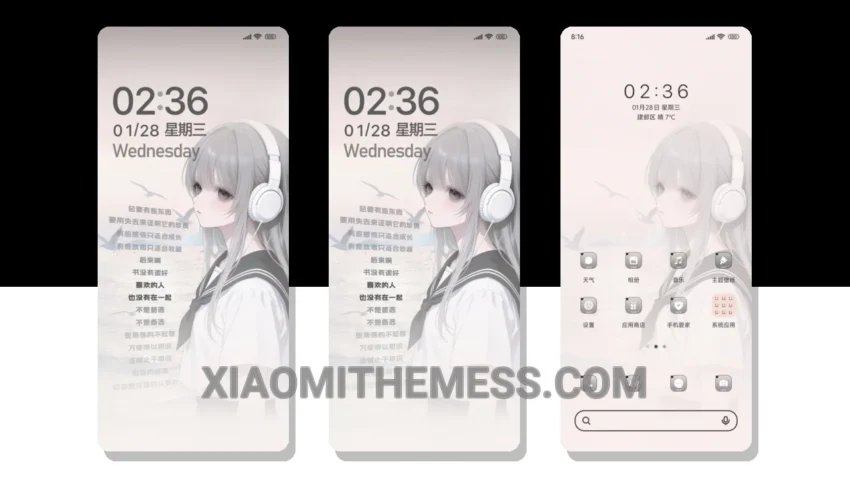
I love deep MTZ themes that change the control center, status bar, and icons. The Regretful Encounter MTZ theme is one such theme that completely transforms the look of my Xiaomi device. With its pastel aesthetic, it gives my device a fresh and clean look.
The theme is fully compatible with HyperOS, MIUI 12, MIUI 13, and MIUI 14, so you don’t have to worry about any compatibility issues. One of the best things about this theme is its custom control center, which is highly customizable and allows you to change the look and feel of your device’s control center.
The Regretful Encounter MTZ theme also features a redesigned status bar that complements the pastel aesthetic of the theme. The theme’s interactive lockscreen widgets are another great feature that allows you to customize your lockscreen to your liking.
Another highlight of this theme is its lightweight design, which means it does not cause any significant battery drain. However, one caveat is that the theme may not be suitable for devices with low storage space, as it requires a significant amount of space to install.
In my testing, I found the Regretful Encounter MTZ theme to be a great option for those looking to give their Xiaomi device a fresh new look. The theme’s pastel aesthetic and custom control center make it a great choice for those who want a unique and personalized look for their device.
Conclusion
To be honest, I’m really impressed with the Regretful Encounter MTZ theme. The theme’s ability to transform the look of my device is amazing, and its compatibility with HyperOS, MIUI 12, MIUI 13, and MIUI 14 makes it a great option for Xiaomi device users. If you’re looking for a theme that can give your device a fresh new look, I would definitely recommend checking out the Regretful Encounter MTZ theme.
Theme Information
🛠️ How to Install This MTZ Theme
- Download the MTZ file to your device.
- Open the official Themes app and go to your profile.
- Import & Apply the downloaded file.