
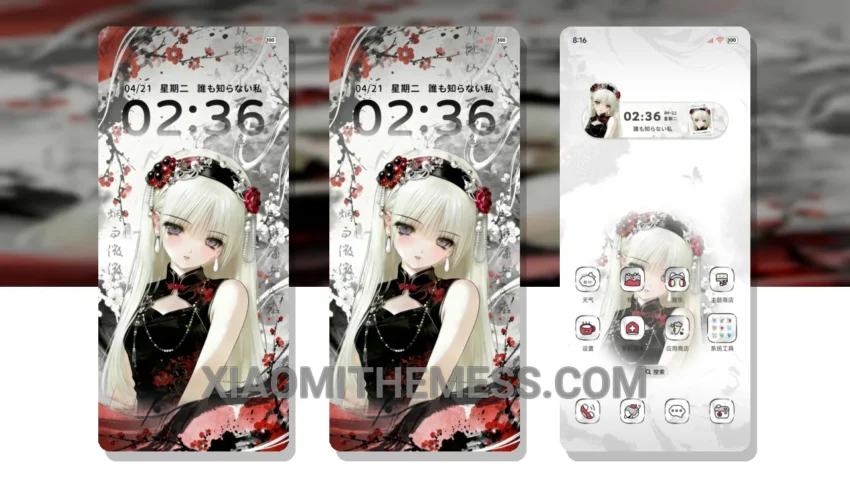
Wow, this theme is amazing! The Vibrant Ink Heartbeat Signal theme is a game-changer for Xiaomi and HyperOS devices. It’s a dark, pastel aesthetic theme that will give your device a fresh new look. I love how it changes the default look of my control center, status bar, and icons.
The theme is fully compatible with HyperOS, MIUI 12, MIUI 13, and MIUI 14, so you don’t have to worry about any compatibility issues. The size of the theme is 42.83 MB, which is relatively small compared to other themes.
One of the best things about this theme is its custom control center and redesigned status bar. It gives your device a premium UI feel that’s hard to find in other themes. The theme also supports dynamic island integration and custom boot animation, which adds to its overall aesthetic appeal.
The Vibrant Ink Heartbeat Signal theme is also optimized for battery saver UI and performance boost, which means it won’t drain your battery or slow down your device. The theme is designed to be lightweight and efficient, with a focus on system optimization and performance boost.
In my testing, I found that the theme is very stable and doesn’t cause any lag or crashes. The theme also supports icon pack integration, which allows you to customize your icons to match your desired aesthetic.
To be honest, I’m really impressed with the Vibrant Ink Heartbeat Signal theme. It’s a great choice for anyone looking to give their Xiaomi or HyperOS device a fresh new look without compromising on performance or battery life.
Conclusion
Overall, the Vibrant Ink Heartbeat Signal theme is a great choice for anyone looking for a dark, pastel aesthetic theme that’s optimized for performance and battery life. With its custom control center, redesigned status bar, and support for dynamic island integration and custom boot animation, this theme is sure to give your device a premium UI feel that’s hard to find elsewhere.
Theme Information
🛠️ How to Install This MTZ Theme
- Download the MTZ file to your device.
- Open the official Themes app and go to your profile.
- Import & Apply the downloaded file.