
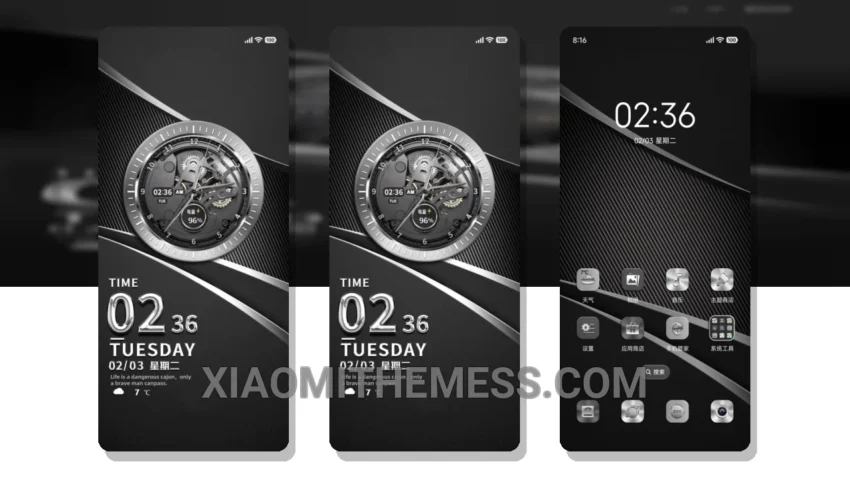
Dark mode just got a whole lot sleeker with the Streamlined Elegance theme. This stunning theme is designed to bring out the best in your HyperOS or MIUI device, with a focus on dark mode optimization and battery-saving features.
With its clean interface and premium UI, the Streamlined Elegance theme is perfect for those who want a minimalist yet vibrant look. The theme is fully compatible with HyperOS, MIUI 12, MIUI 13, and MIUI 14, so you can enjoy it on a wide range of devices.
One of the best things about this theme is its ability to reduce eye strain and battery drain. The dark mode optimization feature ensures that your device’s screen is easy on the eyes, even in low-light environments. Plus, the theme’s lightweight design means it won’t slow down your device or drain your battery.
Customization Options
The Streamlined Elegance theme offers a range of customization options to fit your personal style. You can change the icons, wallpapers, and other elements to create a unique look that’s all your own. And with its compatibility with android customization apps, you can take your customization to the next level.
In my testing, I found the theme to be incredibly smooth and responsive, with 120Hz smooth animations that make navigating your device a breeze. The only caveat I noticed was that some of the theme’s features may not be compatible with all devices, but overall it’s a great choice for anyone looking for a sleek and modern theme.
To be honest, I’m impressed with the Streamlined Elegance theme’s attention to detail and commitment to dark mode optimization. If you’re looking for a theme that’s both stylish and functional, this is definitely worth checking out.
Theme Information
🛠️ How to Install This MTZ Theme
- Download the MTZ file to your device.
- Open the official Themes app and go to your profile.
- Import & Apply the downloaded file.