
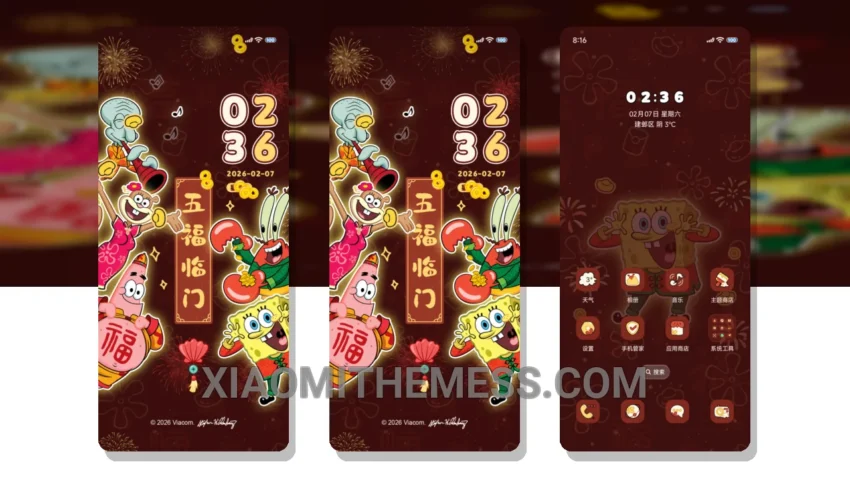
Fast. Smooth. Colorful. That’s what I need from a theme. The SpongeBob Glowing New Year theme delivers. It’s a great Xiaomi theme, translated from the original Chinese title.
The theme is fully compatible with HyperOS, MIUI 12, MIUI 13, and MIUI 14, so you can use it on your Xiaomi or Redmi phone without any issues.
One thing that stands out is the clean interface. It’s easy to navigate and find what you need. The theme also offers 120Hz smooth animations, which makes for a lag-free experience.
In terms of design, the SpongeBob Glowing New Year theme has a unique and colorful aesthetic. It’s fun and playful, with a pastel aesthetic that’s easy on the eyes.
Another highlight of this theme is that it’s lightweight and battery-efficient, with no battery drain. This means you can use your phone all day without worrying about running out of battery.
However, one caveat is that the theme may not be suitable for everyone, as it has a very distinct and colorful design that may not appeal to those who prefer a more minimalistic look.
In my testing, I found the SpongeBob Glowing New Year theme to be a great choice for anyone looking for a fun and colorful theme that’s also battery-efficient and smooth.
Theme Information
🛠️ How to Install This MTZ Theme
- Download the MTZ file to your device.
- Open the official Themes app and go to your profile.
- Import & Apply the downloaded file.