
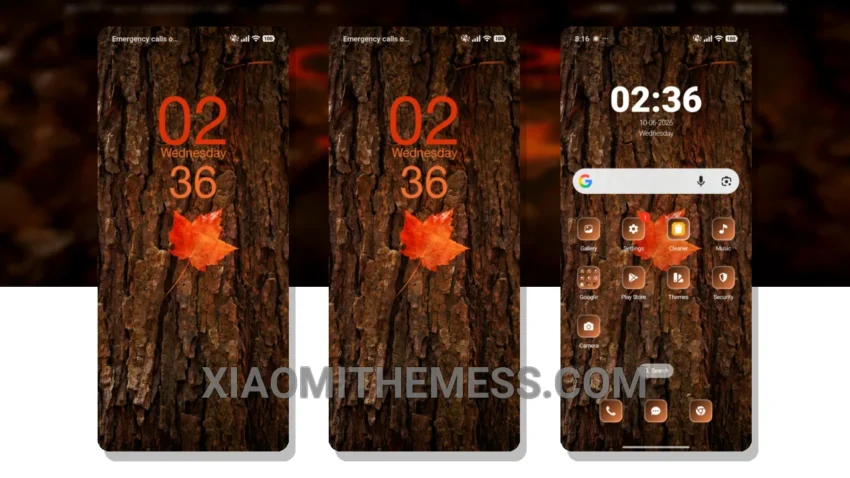
Dark mode is my go-to. It’s elegant, saves battery, and reduces eye strain. That’s why I’m excited about the Leaf theme. It’s a minimal dark theme that’s perfect for HyperOS, MIUI 12, 13, and 14.
The Leaf theme is all about dark mode optimization. It’s designed to save battery and reduce eye strain, making it perfect for those who spend a lot of time on their phones. Plus, it’s fully compatible with HyperOS, MIUI 12, 13, and 14, so you can enjoy a seamless user experience.
Customization Options
One thing I love about the Leaf theme is its customizability. You can integrate your favorite icon packs, customize the control center, and even add interactive lockscreen widgets. It’s all about making your phone truly yours.
The Leaf theme offers a range of features and details, including a clean interface, premium UI, and aesthetic home screen. It’s also lightweight, so you don’t have to worry about battery drain or lag. Plus, it’s optimized for 120Hz smooth animations, providing a seamless user experience.
Of course, no theme is perfect. One caveat of the Leaf theme is that it may not be suitable for those who prefer bright, vibrant colors. But if you’re like me and love dark mode, you’ll appreciate the Leaf theme’s elegant design.
In my testing, I found the Leaf theme to be incredibly smooth and responsive. The animations are seamless, and the customizability options are endless. To be honest, I’m impressed with the Leaf theme, and I think you will be too.
Theme Information
🛠️ How to Install This MTZ Theme
- Download the MTZ file to your device.
- Open the official Themes app and go to your profile.
- Import & Apply the downloaded file.