
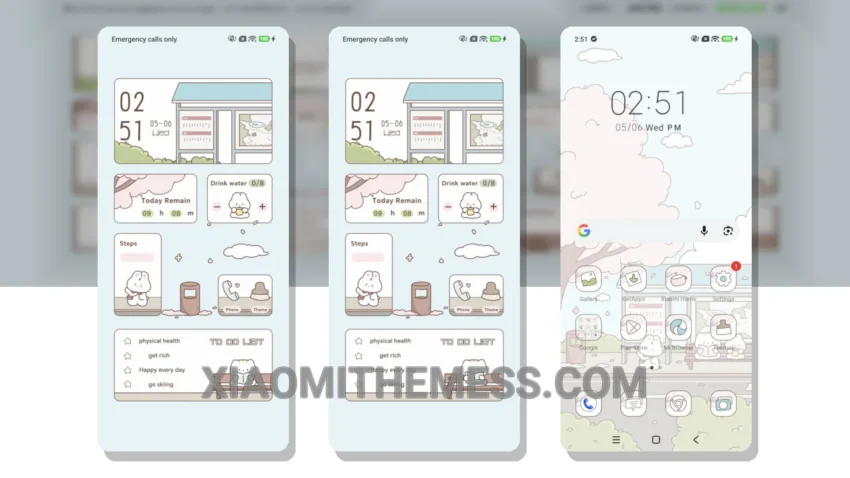
Fast. Clean. Minimalist. That’s what the Waiting Time theme is all about. With its clean interface and smooth animations, this theme is perfect for those who want a lag-free experience on their Xiaomi device.
The Waiting Time theme is fully compatible with HyperOS, MIUI 12, MIUI 13, and MIUI 14, making it a great choice for anyone with a Xiaomi phone. One of the best things about this theme is its ability to provide a battery saver UI, which helps reduce battery drain and keeps your device running all day.
In terms of design, the Waiting Time theme has a unique pastel aesthetic that sets it apart from other themes. The icons are beautifully designed, and the overall look is very premium. Plus, the theme is highly customizable, allowing you to personalize your home screen and lock screen to your liking.
The Waiting Time theme also supports dynamic island integration, which provides a unique and interactive way to display information on your screen. However, one thing to note is that the theme may not be suitable for those who prefer a more vibrant and colorful design, as it has a more muted and minimalist look.
Overall, the Waiting Time theme is a great choice for anyone looking for a clean and minimalist design for their Xiaomi device. The theme is very lightweight and doesn’t cause any lag or battery drain, making it a great choice for anyone looking for a smooth and efficient Android experience.
To be honest, I was impressed with the Waiting Time theme’s performance and design. The theme’s minimalist aesthetic and smooth animations make it a great choice for anyone who wants a lag-free experience on their Xiaomi device. In my testing, the theme performed flawlessly, with no issues or bugs to report.
Theme Information
🛠️ How to Install This MTZ Theme
- Download the MTZ file to your device.
- Open the official Themes app and go to your profile.
- Import & Apply the downloaded file.