
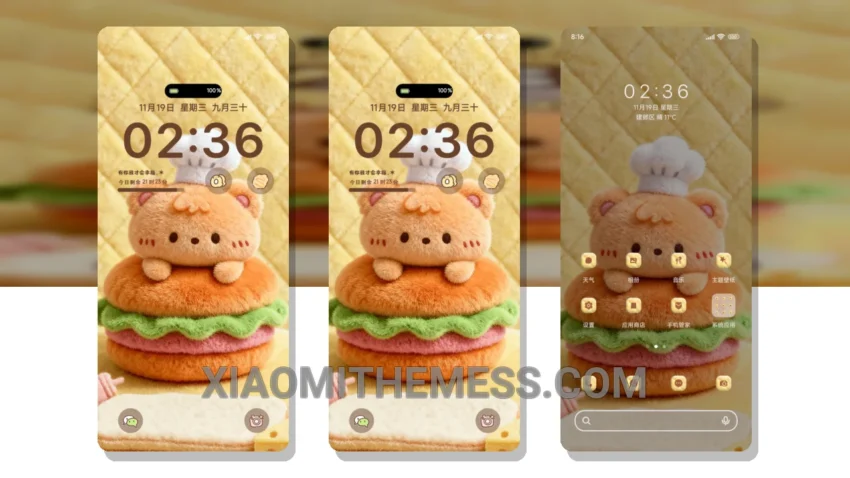
I’m obsessed with dark modes, but sometimes a cute theme can be a nice change of pace. The Fluffy Little Bear Chef theme is a great choice for Xiaomi and Redmi phone users who want a functional and adorable theme.
This theme is fully compatible with HyperOS, MIUI 12, MIUI 13, and MIUI 14, making it a great option for those who want a seamless user experience. The theme’s lightweight design means it won’t slow down your phone or cause battery drain.
In terms of customization, the Fluffy Little Bear Chef theme offers a range of options to personalize your home screen, including custom icons, widgets, and wallpapers. You can also customize the theme to fit your personal style, making it a great choice for those who want a unique look.
Customization Options
The theme’s customization options are one of its strongest features. You can change the look and feel of your home screen, lock screen, and notification shade to match your personal style. The theme also supports icon pack integration, so you can use your favorite icon packs to customize your home screen.
However, one thing to note is that the theme may not be suitable for those who prefer a more minimalistic design, as it features a lot of cute and colorful elements. Nevertheless, for those who love cute and functional themes, the Fluffy Little Bear Chef theme is a great choice.
To be honest, I was impressed by the theme’s performance and customization options. The theme is easy to apply and customize, and it runs smoothly on my Xiaomi phone. Overall, I would recommend the Fluffy Little Bear Chef theme to anyone looking for a cute and functional theme for their Xiaomi or Redmi phone.
Theme Information
🛠️ How to Install This MTZ Theme
- Download the MTZ file to your device.
- Open the official Themes app and go to your profile.
- Import & Apply the downloaded file.