
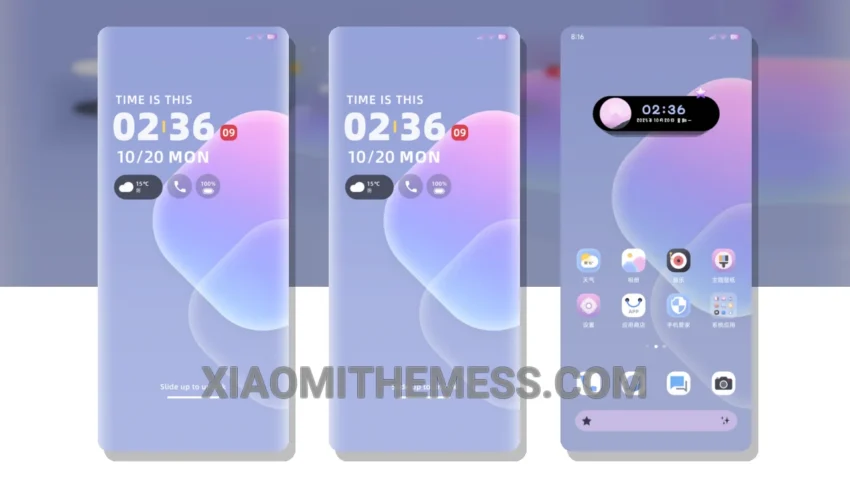
I’m loving the new Simplified Purple Ice Crystal theme! It’s a great Xiaomi theme that completely changes the default look. The theme is fully compatible with HyperOS, MIUI 12, MIUI 13, and MIUI 14, so you don’t have to worry about compatibility issues.
The theme has a beautiful, clean interface with a pastel aesthetic that’s really pleasing to the eye. The custom control center and redesigned status bar are also major highlights of this theme. It’s amazing how much of a difference it makes to the overall look and feel of your device.
One of the best things about this theme is that it’s really lightweight and doesn’t cause any battery drain or lag. The developer has done a great job of optimizing the theme for performance, so you can enjoy a lag-free experience without any issues.
In terms of customization, the theme offers a lot of options. You can customize the icons, widgets, and even the volume panel to your liking. The theme also supports dynamic island integration, which is a great feature for those who want a more iOS-like experience on their Android device.
To be honest, I was a bit skeptical about trying out a new theme, but the Simplified Purple Ice Crystal theme has really won me over. The only downside is that it may not be suitable for everyone, especially those who prefer a more minimalistic look. However, if you’re looking for a theme that’s both beautiful and functional, this is definitely worth checking out.
Conclusion
In my testing, the Simplified Purple Ice Crystal theme has been a great addition to my Xiaomi device. The theme’s compatibility with HyperOS, MIUI 12, MIUI 13, and MIUI 14, along with its lightweight and battery-friendly design, make it a great choice for anyone looking to customize their device. I highly recommend giving it a try if you’re looking for a fresh new look for your Xiaomi phone.
Theme Information
🛠️ How to Install This MTZ Theme
- Download the MTZ file to your device.
- Open the official Themes app and go to your profile.
- Import & Apply the downloaded file.