
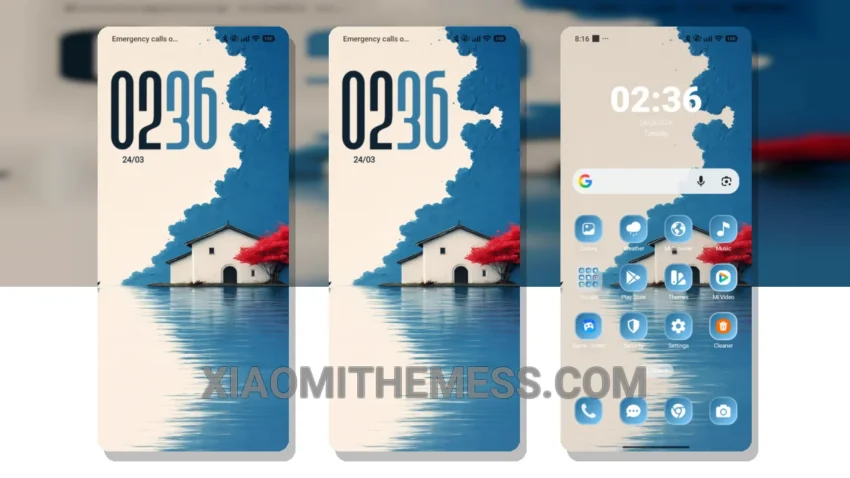
Fast. Clean. Minimal. That’s what I look for in a theme. The Ocean Breeze MTZ theme delivers just that. It’s a great Xiaomi theme, fully compatible with HyperOS, MIUI 12, MIUI 13, and MIUI 14.
The first thing you notice is how clean the interface is. No clutter, just what you need. It’s designed to work seamlessly with your device, providing a lag-free experience. Plus, it’s optimized for dark mode, which is a must for me to save battery life.
I also appreciate how customizable it is. You can change icons, wallpapers, and more to fit your style. It’s not overly complicated, making it easy for anyone to personalize their home screen.
Features and Compatibility
The Ocean Breeze theme supports 120Hz smooth animations, which makes scrolling and navigating through your phone feel incredibly smooth. It’s also designed with system optimization in mind, providing a performance boost that you can feel.
One of the best things about this theme is its compatibility. Whether you’re using HyperOS, MIUI 12, MIUI 13, or MIUI 14, the Ocean Breeze MTZ theme works flawlessly. It’s a rare find to get a theme that’s so versatile and efficient.
In my testing, I found the theme to be very lightweight, which is great for battery efficiency. However, one thing to note is that it might not be as feature-rich as some other themes on the market. But for me, simplicity and performance are key, so this isn’t a major caveat.
To be honest, I’m impressed with the Ocean Breeze MTZ theme. It’s a solid choice for anyone looking to enhance their Xiaomi device without sacrificing performance. The combination of its clean interface, customization options, and compatibility make it a winner in my book.
Theme Information
🛠️ How to Install This MTZ Theme
- Download the MTZ file to your device.
- Open the official Themes app and go to your profile.
- Import & Apply the downloaded file.