
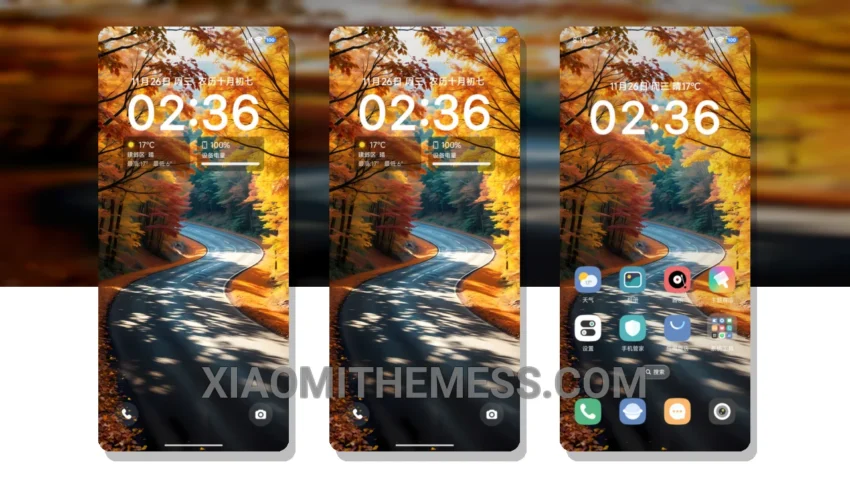
Dark mode, all the time. That’s my motto. The Simple Golden Path theme is a great example of how dark mode optimization can elevate the user experience. With its clean interface and minimal vibrant design, this theme is perfect for those who want a sleek and modern look without sacrificing functionality.
The Simple Golden Path theme is fully compatible with HyperOS, MIUI 12, MIUI 13, and MIUI 14, making it a great choice for Xiaomi and Redmi phone users. One of the highlights of this theme is its lag-free experience, thanks to its lightweight design and system optimization.
Another detail of the Simple Golden Path theme is its ability to reduce eye strain and save battery life. By utilizing AMOLED pure black theme technology, this theme ensures that your screen remains crisp and vibrant while minimizing power consumption.
However, some users may find the theme’s design to be a bit too simplistic. This could be seen as a caveat, but for those who value a clean and minimalist aesthetic, the Simple Golden Path theme is a great choice.
In my testing, I found the Simple Golden Path theme to be highly responsive and customizable. The theme’s icon pack integration and custom boot animation features allow users to personalize their home screen and make it truly unique.
Conclusion
To be honest, I’m impressed with the Simple Golden Path theme. Its dark mode optimization, minimal vibrant design, and lag-free experience make it a great choice for Xiaomi and Redmi phone users. If you’re looking for a theme that’s both stylish and functional, the Simple Golden Path theme is definitely worth considering.
Theme Information
🛠️ How to Install This MTZ Theme
- Download the MTZ file to your device.
- Open the official Themes app and go to your profile.
- Import & Apply the downloaded file.