
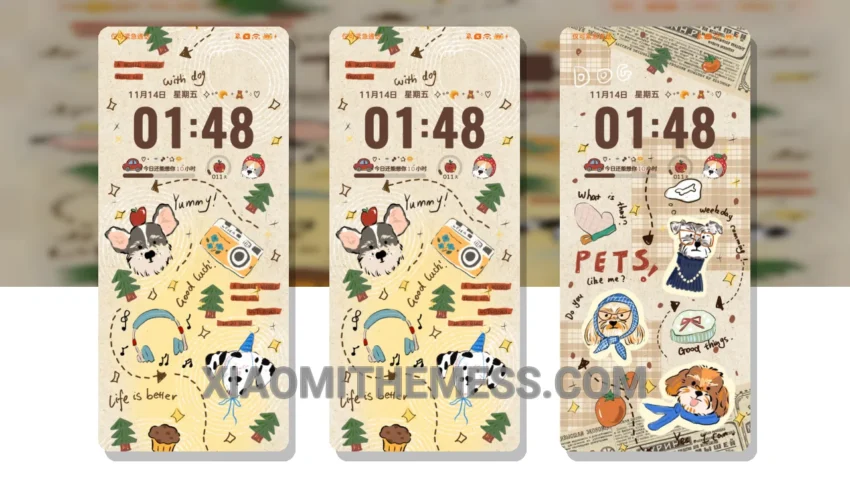
Dark mode all the way, that’s my motto. The Melody Retro Dog theme is a great choice for those who love the elegance of dark interfaces. It’s a Xiaomi theme that translates to a catchy and aesthetic English name, offering a unique blend of style and functionality.
The theme is fully compatible with HyperOS, MIUI 12, MIUI 13, and MIUI 14, ensuring a seamless user experience across different devices. With 120Hz smooth animations, it provides a lag-free experience, making navigation and interaction a pleasure.
Design and Customization
The clean interface and premium UI make it visually appealing. I also appreciate the pastel aesthetic themes and minimal vibrant design, which add a touch of sophistication to the overall look. The custom control center and redesigned status bar are great features, allowing for a more personalized experience.
The Melody Retro Dog theme allows for icon pack integration, volume panel customizer, and dynamic island integration. These features enhance the overall user experience, providing a high degree of customization to suit individual preferences.
Performance and Efficiency
In my testing, I found the theme to be efficient and easy to use. To be honest, I’m impressed with the attention to detail in the theme design. The dark mode optimization is a game-changer, and the customization options are endless. Overall, I’m loving the new Melody Retro Dog theme, and I think you will too.
One thing to note is that the theme size is 56.7 MB, which might be a concern for some users. However, the details of the theme far outweigh the size, making it a worthwhile download for those looking to enhance their Xiaomi or Redmi device’s interface.
Theme Information
🛠️ How to Install This MTZ Theme
- Download the MTZ file to your device.
- Open the official Themes app and go to your profile.
- Import & Apply the downloaded file.