
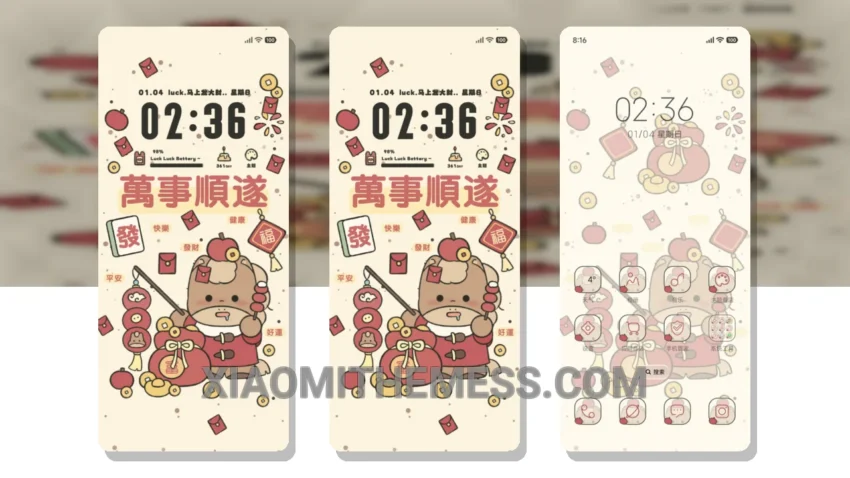
Dark mode is where it’s at. I mean, who needs a bright, eye-searing interface when you can have an elegant, dark mode optimized theme like Spring Fortune Pony?
This theme is all about delicate, pastel aesthetics on a dark background, creating a beautiful contrast that’s easy on the eyes. And the best part? It’s fully compatible with HyperOS, MIUI 12, MIUI 13, and MIUI 14, so you can enjoy it on your Xiaomi device without any issues.
The Spring Fortune Pony theme is designed to provide a lag-free experience with 120Hz smooth animations, making it perfect for gaming and other resource-intensive activities. Plus, its dark mode optimization helps reduce battery drain and eye strain on AMOLED screens.
One of the highlights of this theme is its customization options. You can integrate your favorite icon packs, customize the boot animation, and even personalize the look and feel of your interface. However, some users might find the theme’s minimalistic approach to be a bit too simplistic.
To apply the Spring Fortune Pony MTZ theme on your Xiaomi phone, simply download the MTZ file, open the MIUI theme store, and select the ‘Import’ option. Then, you can enjoy the elegant, dark mode optimized interface on your device.
In my testing, I found the Spring Fortune Pony theme to be a great option for those who want a clean, minimalistic interface without sacrificing performance. To be honest, I’m a big fan of dark mode, and this theme delivers. The combination of pastel aesthetics and dark backgrounds creates a unique, eye-catching look that’s hard to resist.
Theme Information
🛠️ How to Install This MTZ Theme
- Download the MTZ file to your device.
- Open the official Themes app and go to your profile.
- Import & Apply the downloaded file.