
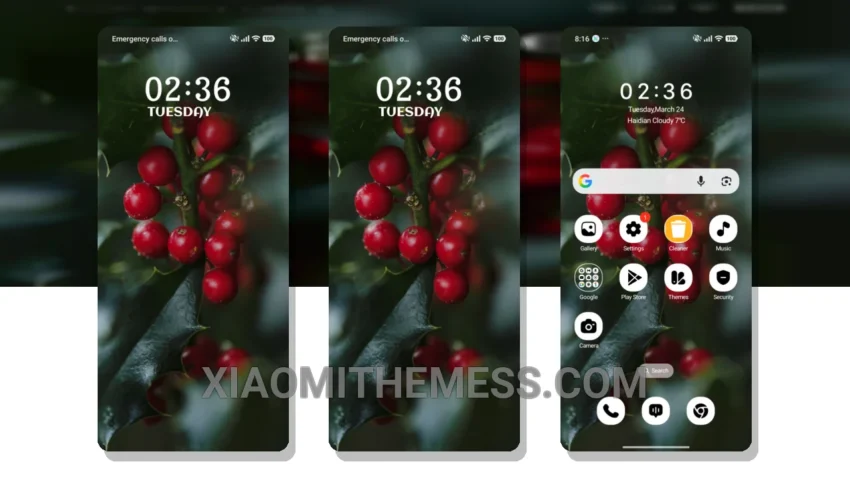
Dark mode is my jam. I mean, who doesn’t love the elegance of a pure black theme? It’s not just about aesthetics; it’s also about saving battery life and reducing eye strain. That’s why I’m excited about the Winter Berries theme.
This theme is a great example of how to do dark mode right. The contrast is perfect, and the AMOLED optimization is top-notch. Plus, it’s fully compatible with HyperOS, MIUI 12, MIUI 13, and MIUI 14, so you can enjoy it on your Xiaomi or Redmi phone.
One of the best things about the Winter Berries theme is its clean interface. It’s not cluttered or overwhelming, making it easy to navigate and find what you need. The theme also comes with some beautiful wallpapers that complement the dark mode perfectly.
Customization Options
In terms of customization, the Winter Berries theme offers a lot of options. You can change the icons, wallpapers, and other elements to suit your preferences. This is great for those who like to personalize their phone’s look and feel.
Overall, I’m really impressed with the Winter Berries theme. The only downside is that it can be a bit heavy on resources, which may cause some lag on lower-end devices. However, for most users, this won’t be a problem.
To be honest, I’ve been using the Winter Berries theme for a while now, and I’m really happy with it. The lag-free experience is great, and the theme’s overall design is top-notch. If you’re looking for a beautiful and functional theme for your Xiaomi or Redmi phone, I highly recommend checking out the Winter Berries theme.
Theme Information
🛠️ How to Install This MTZ Theme
- Download the MTZ file to your device.
- Open the official Themes app and go to your profile.
- Import & Apply the downloaded file.