
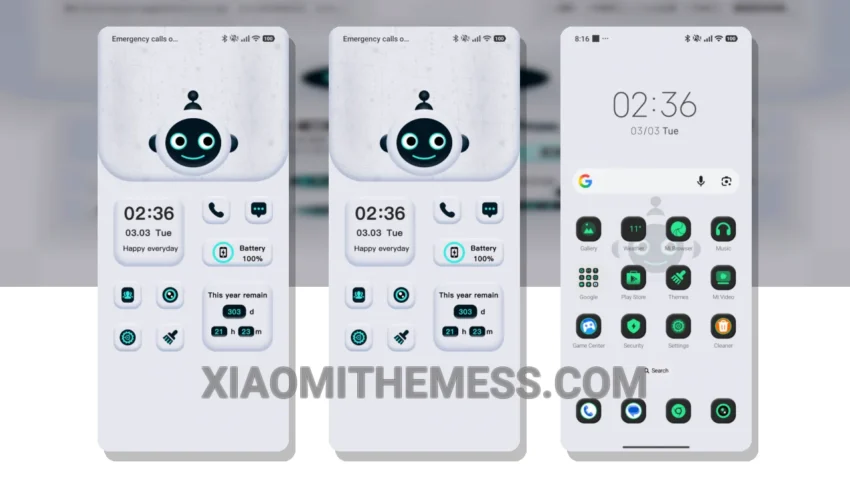
Love at first sight! Mechanical Whimsy is not just a theme, it’s an experience. This pastel aesthetic theme will transform your Xiaomi into a work of art.
Short and sweet, the installation process is easy. Just download the MTZ file, import it into your theme manager, and select Mechanical Whimsy. Boom! Your new theme is applied.
About the Theme
Now, let’s talk about the good stuff. Mechanical Whimsy boasts a clean interface and battery saver UI, perfect for those who want a premium look without compromising performance. Plus, with dark mode optimization, you can enjoy your device in style, even in low-light environments.
One of the best things about Mechanical Whimsy is its attention to detail. From the custom control center to the redesigned status bar, every element is carefully crafted to provide a unique and aesthetic home screen. And, with icon pack integration, you can further customize your device to suit your taste.
Performance and Compatibility
Compatible with HyperOS, MIUI 12, MIUI 13, and MIUI 14, you can enjoy a seamless and lag-free experience across different devices. The theme is incredibly lightweight and doesn’t cause any battery drain. The 120Hz smooth animations make navigation a breeze, and the overall performance is top-notch.
However, I did notice that the theme can be a bit too minimalistic for some users, which might be a caveat for those who prefer more vibrant colors.
To be honest, I’m impressed with Mechanical Whimsy. The combination of pastel colors, minimalistic design, and smooth performance makes it a must-try for any Xiaomi user. So, what are you waiting for? Download Mechanical Whimsy today and experience the perfect blend of style and functionality!
Theme Information
🛠️ How to Install This MTZ Theme
- Download the MTZ file to your device.
- Open the official Themes app and go to your profile.
- Import & Apply the downloaded file.