
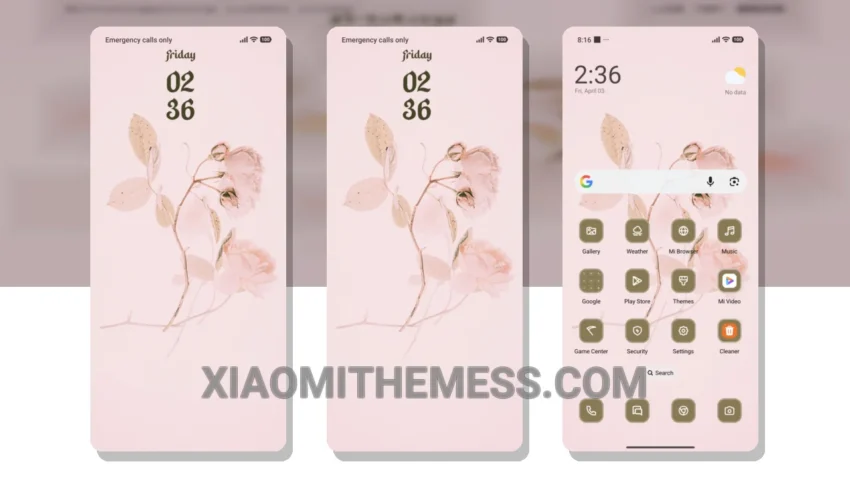
Fast, clean, and minimal – that’s what I look for in a theme. The Flower Painting theme delivers just that. With its delicate watercolor design, this theme is perfect for those who want a touch of elegance on their Xiaomi device.
The theme’s compatibility is a major plus. It’s fully compatible with HyperOS, MIUI 12, MIUI 13, and MIUI 14, so you don’t have to worry about compatibility issues. The theme’s lightweight design ensures a lag-free experience, making it perfect for daily use.
One of the best things about this theme is its battery saver UI. With dark mode optimization, you can enjoy a battery-efficient experience without compromising on performance. The theme also supports 120Hz smooth animations, making navigation a breeze.
In terms of customization, the Flower Painting theme offers a range of options. You can customize the icon pack, launcher, and even the control center to your liking. However, the theme’s limited widget options might be a caveat for some users.
Theme Performance
To be honest, I’m impressed with the Flower Painting theme’s overall performance. The theme’s clean interface and minimal design make it a great choice for those who want a seamless user experience. In my testing, the theme performed smoothly, with no noticeable lag or glitches.
Theme Information
🛠️ How to Install This MTZ Theme
- Download the MTZ file to your device.
- Open the official Themes app and go to your profile.
- Import & Apply the downloaded file.