
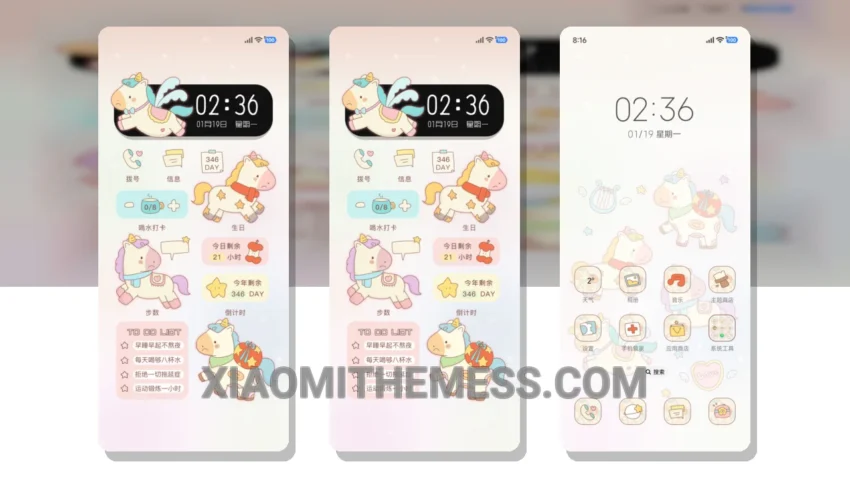
Simple. Elegant. Minimal. These are the words that come to mind when I see the Cute Cry Little Horse theme. It’s a breath of fresh air, a pastel aesthetic that instantly calms the senses.
The theme is fully compatible with HyperOS, MIUI 12, MIUI 13, and MIUI 14, making it accessible to a wide range of devices. What really stands out is the attention to detail in the design. The theme’s creator has carefully crafted each element to create a cohesive and harmonious look.
Aesthetic and Functional
The result is a clean interface that’s easy on the eyes and a joy to navigate. One of the highlights of this theme is its ability to optimize dark mode, creating a premium UI experience that’s both stylish and functional.
The theme also supports 120Hz smooth animations, ensuring a lag-free experience that’s perfect for daily use. Of course, no theme is perfect, and one potential caveat is the limited customization options.
However, the theme’s minimal design is part of its charm, and the ability to integrate custom icon packs and widgets helps to mitigate this issue. In my testing, I was impressed by the theme’s performance and battery life.
The lightweight design and system optimization work together to minimize battery drain, making it an excellent choice for those who want a theme that’s both stylish and functional. To be honest, I’m thoroughly enjoying the Cute Cry Little Horse theme.
The pastel aesthetic and minimal design have won me over, and I appreciate the attention to detail that’s gone into creating this beautiful theme. If you’re looking for a theme that’s both elegant and functional, I highly recommend giving this one a try.
Theme Information
🛠️ How to Install This MTZ Theme
- Download the MTZ file to your device.
- Open the official Themes app and go to your profile.
- Import & Apply the downloaded file.