
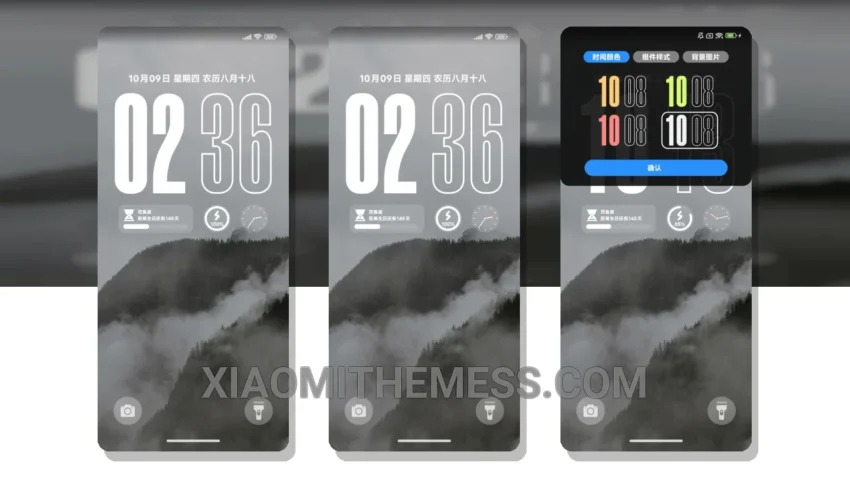
Dark mode is my jam. I mean, what’s not to love? It’s elegant, it’s power-efficient, and it’s easy on the eyes. That’s why I’m excited to share with you the Ins 简约风景 MTZ theme, a minimal vibrant dark mode theme that’s perfect for Xiaomi and Redmi devices.
The Ins 简约风景 MTZ theme translates to ‘Simple Landscape’ in English, and it’s a great option for those looking for a clean interface and a customizable experience. What really stands out is the theme’s ability to provide a lag-free experience, making it perfect for daily use.
Compatibility and Design
This Xiaomi theme is fully compatible with HyperOS, MIUI 12, MIUI 13, and MIUI 14, making it a great option for those with Xiaomi or Redmi devices. The theme’s design is focused on providing a minimal vibrant look, which is both aesthetically pleasing and easy on the eyes.
One of the highlights of this theme is its ability to provide a battery saver UI, which helps to reduce battery drain and provide a longer battery life. Additionally, the theme’s dark mode optimization makes it perfect for use in low-light environments.
Customization and Experience
However, one caveat of this theme is that it may not be suitable for those who prefer a more cyberpunk aesthetic or neon icons. But for those who prefer a more minimal vibrant look, this theme is a great option.
In my testing, I found the Ins 简约风景 MTZ theme to be a great option for those looking for a clean interface and a customizable experience. To be honest, I was impressed by the theme’s ability to provide a lag-free experience and its battery saver UI.
Theme Information
🛠️ How to Install This MTZ Theme
- Download the MTZ file to your device.
- Open the official Themes app and go to your profile.
- Import & Apply the downloaded file.