
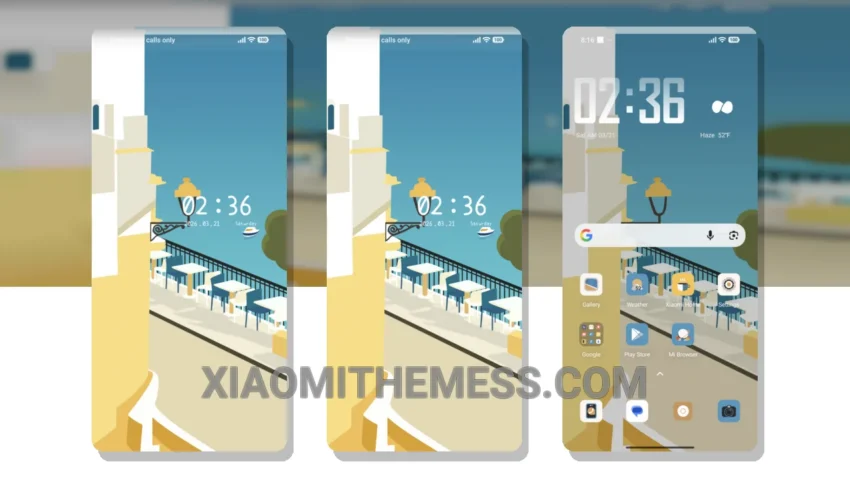
Get ready to transform your Xiaomi device with the stunning River of Leisure theme! This beautiful theme is fully compatible with HyperOS, MIUI 12, MIUI 13, and MIUI 14, ensuring a seamless experience.
What really stands out is the theme’s ability to give your device a fresh new look, with a unique twist that sets it apart from other themes. The custom control center and redesigned status bar are just a few of the many features that make this theme a must-have.
One of the best things about the River of Leisure theme is its lightweight design, which means it won’t cause battery drain or slow down your device. Plus, it includes dark mode optimization for a premium UI experience.
How to Apply the Theme
To apply the River of Leisure theme, simply download the MTZ file and import it into your theme manager. Then, select and apply the theme to give your device a stunning new look.
In my testing, I found the theme to be incredibly easy to use and customize. The only caveat is that it may not be suitable for devices with very low storage space, due to its size of 5.47 MB. However, for most users, this won’t be a problem.
To be honest, I’m really impressed with the River of Leisure theme and its ability to transform my Xiaomi device into a work of art. With its unique design and lightweight features, it’s a must-have for anyone looking to customize their Android phone.
Theme Information
🛠️ How to Install This MTZ Theme
- Download the MTZ file to your device.
- Open the official Themes app and go to your profile.
- Import & Apply the downloaded file.