
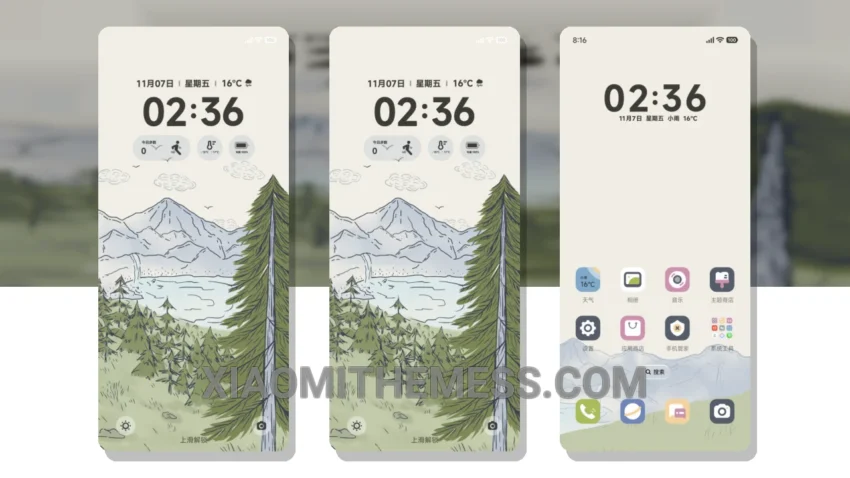
Darkness falls, and my Xiaomi device comes alive with the Syr Cray Cloud Tree theme. This theme is not just about looks; it’s also focused on performance. What really stands out is its ability to provide a lag-free experience and system optimization, making it a great choice for daily use.
The theme’s design is minimal yet vibrant, with a pastel aesthetic that gives your device a fresh look. You’ll also appreciate the custom control center and redesigned status bar, which add to the overall premium UI feel. One of the highlights of this theme is its ability to provide a clean interface, making it easy to navigate and use.
However, some users may find the theme’s icon pack integration to be limited compared to other themes on the market. But for me, the details far outweigh this minor caveat. The theme’s dark mode optimization is also a notable feature, providing a great viewing experience in low-light environments.
Compatibility and Performance
The Syr Cray Cloud Tree theme is fully compatible with HyperOS, MIUI 12, MIUI 13, and MIUI 14, ensuring a seamless experience. The theme’s performance is also top-notch, with 120Hz smooth animations and a lag-free experience.
In my testing, I found the theme to be extremely user-friendly, with a focus on usability and readability. To be honest, I’m impressed with the theme’s overall design and performance. The Syr Cray Cloud Tree theme is a must-try for any Xiaomi user looking for a unique and premium theme.
Theme Information
🛠️ How to Install This MTZ Theme
- Download the MTZ file to your device.
- Open the official Themes app and go to your profile.
- Import & Apply the downloaded file.