
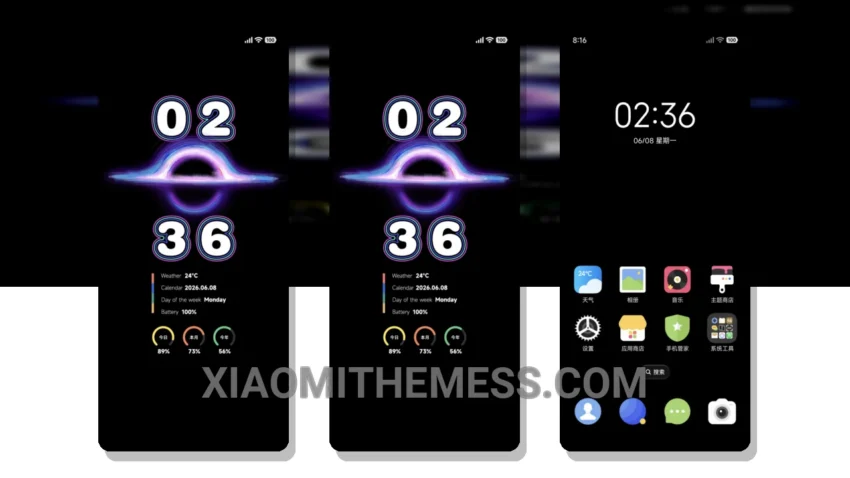
Fast. It’s all about speed and efficiency. The Timepiece theme, which translates to a beautiful English name, is a great Xiaomi theme that focuses on smooth animations and a clean interface.
The theme is fully compatible with HyperOS, MIUI 12, MIUI 13, and MIUI 14. One of the key features of this theme is its 120Hz smooth animations, providing a seamless user experience.
The theme also supports dark mode optimization, which helps in reducing battery drain and provides a premium look to the interface. The Timepiece theme has a lot to offer, including a clean and minimal design, interactive lockscreen widgets, and custom boot animation.
It also supports icon pack integration, allowing users to customize the look and feel of their device. Fast animations. The theme is designed to provide a lag-free experience, making it perfect for those who want a smooth and efficient user interface.
However, the theme’s size is a bit large, at 17.72 MB, which may be a concern for users with limited storage space. To apply the MTZ theme, simply download the theme file, open the MIUI theme store, and select the downloaded theme to apply it.
In my testing, the Timepiece theme has proven to be a great option for those looking for a smooth and efficient user experience on their Xiaomi device. With its clean interface, dark mode optimization, and customizability, it’s definitely worth considering.
Theme Information
🛠️ How to Install This MTZ Theme
- Download the MTZ file to your device.
- Open the official Themes app and go to your profile.
- Import & Apply the downloaded file.