
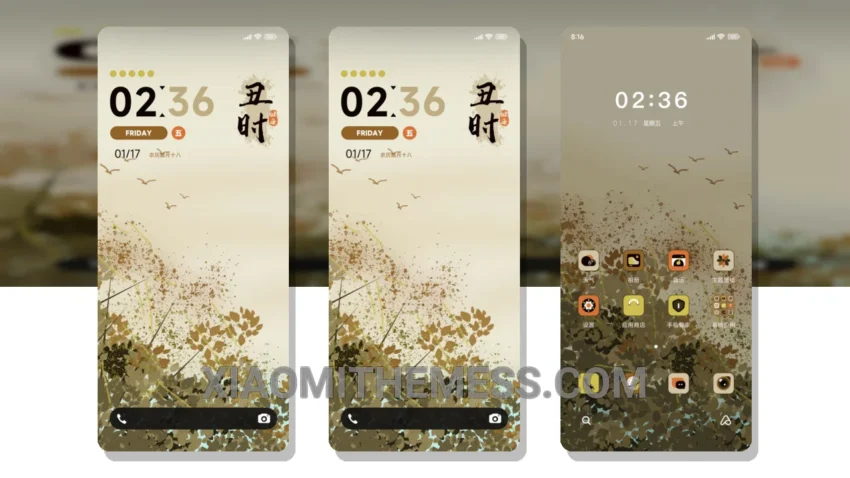
I’m obsessed with the Autumn Timing MTZ theme! It completely overhauls my device’s look. The custom control center is sleek, and the redesigned status bar is so cool. Instantly, my phone looks fresh.
So, what’s the big deal? This theme is fully compatible with HyperOS, MIUI 12, MIUI 13, and MIUI 14. That means you can enjoy it on your Xiaomi device without any issues.
One thing that really stands out is how lightweight the theme is. It doesn’t slow down my phone or drain the battery. Plus, it’s got a great dark mode optimization which is perfect for saving battery life.
Another highlight is the theme’s clean interface. It’s so easy to navigate, and the interactive lockscreen widgets are really fun to use. However, some might find the theme’s design a bit too minimalist.
To be honest, I’ve tried a lot of themes, but this one is my favorite. The Autumn Timing MTZ theme is a must-try for anyone who wants to give their Xiaomi device a unique look. I love how it transforms my phone’s home screen into a beautiful, aesthetic home screen that’s both premium and stylish.
Getting Started
Applying the theme is easy. Just download it from the theme store, and follow the in-app instructions. You can also customize the theme further using various android customization apps and icon packs.
In my testing, I found the theme to be really stable and lag-free. The 120Hz smooth animations make it feel really premium. Overall, I’m really happy with the Autumn Timing MTZ theme, and I think you will be too.
Theme Information
🛠️ How to Install This MTZ Theme
- Download the MTZ file to your device.
- Open the official Themes app and go to your profile.
- Import & Apply the downloaded file.