
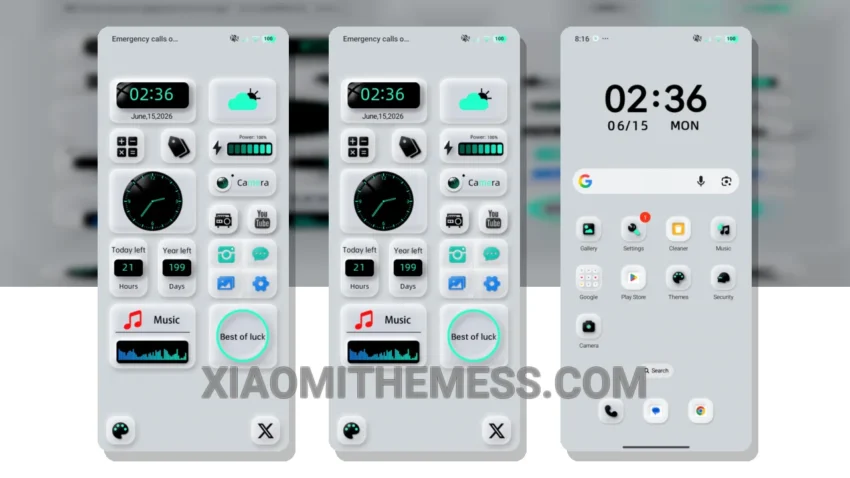
Dark mode is not just a trend, it’s a way of life. For those who appreciate the elegance of dark interfaces, the Glass Scrub theme is a must-have. With its minimal vibrant design, this theme provides a visually appealing aesthetic without overwhelming the senses.
The theme’s pastel colors and sleek layout make it perfect for those who value simplicity and elegance. Plus, it’s fully compatible with HyperOS, MIUI 12, MIUI 13, and MIUI 14, making it accessible to a wide range of Xiaomi and Redmi devices.
Performance and Customization
The Glass Scrub theme is designed to be lightweight, ensuring no battery drain and a lag-free experience. This is particularly important for users who want a seamless and efficient interface that does not compromise on performance. Additionally, the theme supports dark mode optimization, which is perfect for devices with AMOLED screens.
The theme also includes a range of customization options, such as icon pack integration and a custom control center. This allows users to personalize their home screen and make the most of their device’s features.
One of the best things about the Glass Scrub theme is its ability to provide a clean interface that is easy to read and use every day. The theme’s minimal vibrant design makes it perfect for those who value simplicity and elegance.
To be honest, I was impressed by the Glass Scrub theme’s clean interface and customization options. In my testing, the theme performed smoothly and did not cause any battery drain. Overall, I would highly recommend the Glass Scrub theme to anyone looking for a reliable and elegant UI for their Xiaomi or Redmi device.
Theme Information
🛠️ How to Install This MTZ Theme
- Download the MTZ file to your device.
- Open the official Themes app and go to your profile.
- Import & Apply the downloaded file.