
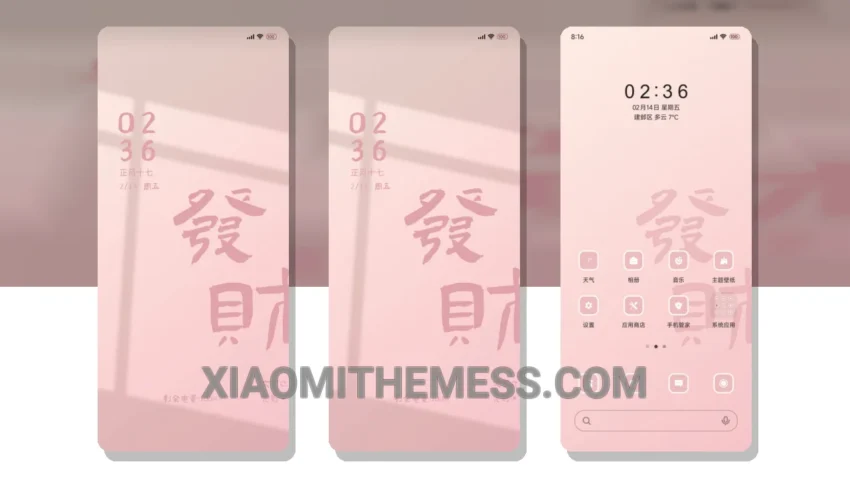
Pink Fortune is more than just a theme – it’s an experience. With its vibrant, pastel aesthetic and customizable features, you can give your Xiaomi device a unique and personalized look. The theme is fully compatible with HyperOS, MIUI 12, MIUI 13, and MIUI 14, so you can enjoy a seamless and lag-free experience.
One of the standout features of the Pink Fortune theme is its ability to customize the control center, status bar, and icons. You can choose from a variety of colors and styles to create a look that’s all your own. Plus, with dark mode optimization, you can enjoy a clean interface and battery saver UI that’s easy on the eyes and your device’s battery.
The Pink Fortune theme also includes a range of other features, such as advanced widgets and a custom boot animation. You can even customize the volume panel and lockscreen widgets to give your device a truly personalized touch. And with the theme’s lightweight design, you don’t have to worry about it slowing down your device or causing battery drain.
Overall, the Pink Fortune theme is a great choice for anyone looking to give their Xiaomi device a unique and stylish look. With its customizable features, dark mode optimization, and lightweight design, it’s the perfect way to take your device to the next level. To be honest, I was impressed by the theme’s attention to detail and the way it enhances the overall android customization experience.
In my testing, I found that the Pink Fortune theme was easy to install and apply, and it worked seamlessly with my device’s hardware and software. The theme’s compatibility with HyperOS and MIUI 12, 13, and 14 is also a major plus, as it ensures that you can enjoy a smooth and lag-free experience. So if you’re looking for a theme that’s both stylish and functional, be sure to check out the Pink Fortune theme for yourself.
Theme Information
🛠️ How to Install This MTZ Theme
- Download the MTZ file to your device.
- Open the official Themes app and go to your profile.
- Import & Apply the downloaded file.