
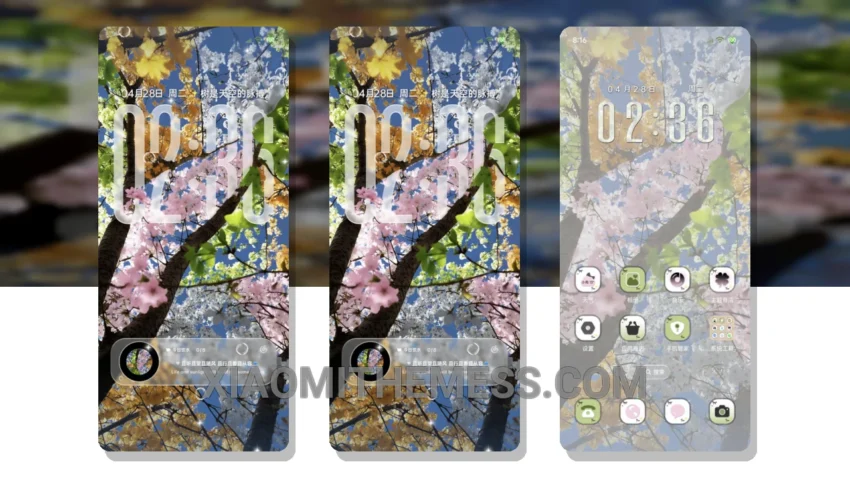
Seasonal Shift is a great Xiaomi theme that brings a unique grid change design to your device. The theme is fully compatible with HyperOS, MIUI 12, MIUI 13, and MIUI 14, ensuring a seamless experience across different devices.
The theme’s elegant design is inspired by the changing seasons, with a focus on clean interface and minimalistic aesthetics. The result is a theme that is both visually appealing and easy to use.
One of the key details of the Seasonal Shift theme is its ability to provide a lag-free experience, thanks to its lightweight design and optimization for smooth animations. This makes it perfect for daily use, whether you’re browsing the web, checking emails, or using your favorite apps.
In terms of customization, the theme offers a range of options, including icon pack integration and advanced widgets. This allows you to personalize your home screen and make it truly unique. However, it’s worth noting that the theme’s customization options may not be as extensive as some other themes on the market.
To apply the theme, simply download and install it, then go to the theme store and select the Seasonal Shift theme to apply it. The theme size is 48.05 MB, making it a relatively small download compared to other themes.
In my testing, I found the Seasonal Shift theme to be a great option for those looking for a reliable and elegant theme. The theme’s focus on battery saver UI and dark mode optimization makes it a great choice for those who want to conserve battery life without sacrificing style.
Theme Information
🛠️ How to Install This MTZ Theme
- Download the MTZ file to your device.
- Open the official Themes app and go to your profile.
- Import & Apply the downloaded file.