
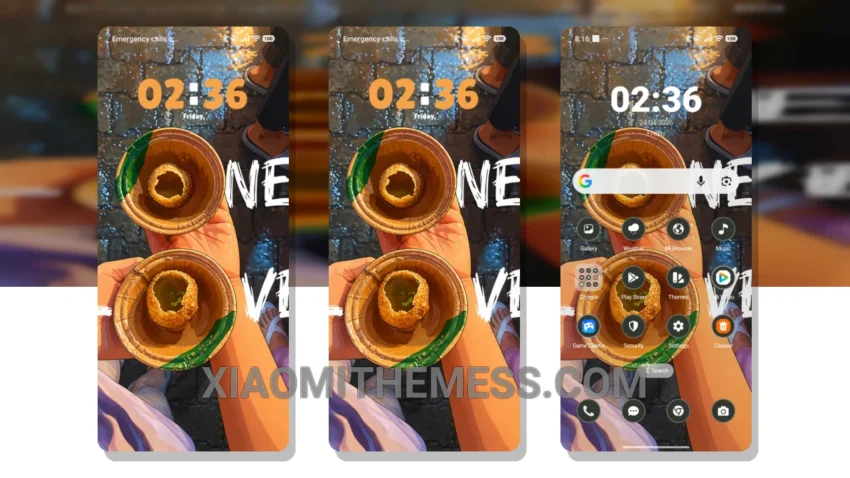
Love it! This Fuchka theme is a game-changer. It totally revamps the default look, giving you a fresh new feel. I mean, who doesn’t love a good dark mode optimization? It’s sleek, it’s modern, and it’s perfect for those who want a clean interface.
So, what’s the big deal about this theme? For starters, it’s fully compatible with HyperOS, MIUI 12, MIUI 13, and MIUI 14. That means you can enjoy it on a wide range of devices, including Xiaomi and Redmi phones. Plus, it’s designed to be lightweight, so you don’t have to worry about no battery drain or lag.
Now, let’s talk about the design. The Fuchka theme features a beautiful, pastel aesthetic that’s both soothing and stylish. The icons are custom-designed to match the theme’s color scheme, and the overall look is just fantastic. You’ll also love the custom control center and redesigned status bar, which add a touch of elegance to your device.
In my opinion, the Fuchka theme is a must-have for anyone who wants to give their device a unique look. Yes, it’s a bit of a challenge to find the perfect theme, but trust me, this one’s worth it. To be honest, I was blown away by the attention to detail and the overall quality of the theme. So, what are you waiting for? Download the Fuchka theme today and experience the difference for yourself!
Compatibility and Features
The Fuchka theme is designed to work seamlessly with HyperOS, MIUI 12, MIUI 13, and MIUI 14. It’s also compatible with a wide range of devices, including Xiaomi and Redmi phones. Some of the key features of the theme include custom icons, a custom boot animation, and interactive lockscreen widgets. Overall, it’s a great choice for anyone who wants a unique and stylish theme that’s also functional and easy to use.
One thing to keep in mind is that the theme may not be suitable for devices with low storage space, as it’s a bit on the larger side (7.95 MB). However, if you’ve got the space to spare, I highly recommend giving it a try. In my testing, I found that the theme performed smoothly and didn’t cause any issues with my device’s performance.
Theme Information
🛠️ How to Install This MTZ Theme
- Download the MTZ file to your device.
- Open the official Themes app and go to your profile.
- Import & Apply the downloaded file.