
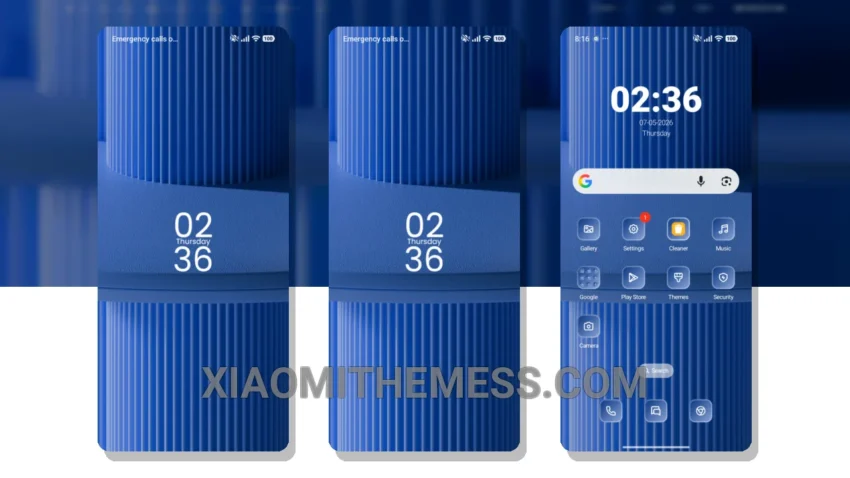
Instantly give your Xiaomi device a fresh new look with the Blue Lines theme! This amazing theme is fully compatible with HyperOS, MIUI 12, MIUI 13, and MIUI 14, so you can enjoy it regardless of your device’s operating system.
One of the best things about the Blue Lines theme is its ability to completely transform your device’s interface. From the custom control center to the redesigned status bar, every aspect of your device’s UI is revamped to create a unique and captivating visual experience.
The Blue Lines theme also includes a range of beautiful icons that complement its overall aesthetic. With its stunning visuals and sleek design, this theme is perfect for anyone looking to give their device a personal touch.
In terms of performance, the Blue Lines theme is incredibly lightweight, which means it won’t cause any significant battery drain or slow down your device. This makes it an excellent choice for users who want a theme that’s both stylish and efficient.
However, some users may find that the theme’s font style can be a bit hard to read at times, especially for those with vision impairments. Despite this, the Blue Lines theme remains an excellent option for anyone seeking a distinctive and eye-catching theme for their Xiaomi device.
To be honest, I’m thoroughly impressed with the Blue Lines theme, and I think it’s a great choice for anyone looking to customize their device’s interface. With its stunning visuals, sleek design, and lightweight performance, this theme is sure to provide a unique and enjoyable user experience.
Theme Information
🛠️ How to Install This MTZ Theme
- Download the MTZ file to your device.
- Open the official Themes app and go to your profile.
- Import & Apply the downloaded file.