
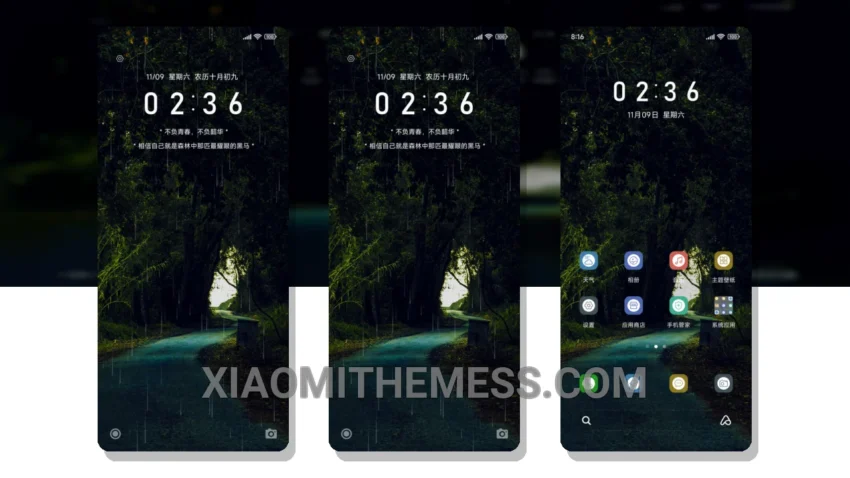
Love deep, dark themes? The Forest Path Eye Care theme is a must-try! It’s a great Xiaomi theme that completely transforms your device’s look. With its minimalist dark design, you’ll get a clean interface that’s easy on the eyes.
One thing that stands out is the custom control center – it’s so sleek! The redesigned status bar is also a nice touch. And with the theme being fully compatible with HyperOS, MIUI 12, MIUI 13, and MIUI 14, you can enjoy it on a wide range of devices.
The Forest Path Eye Care theme is all about simplicity and elegance. It’s perfect for those who want a minimalistic look without sacrificing style. Plus, it’s a great way to give your device a fresh new look without having to buy a new phone.
Another detail of this theme is that it’s lightweight and won’t slow down your device. You’ll get a lag-free experience and can enjoy the theme without worrying about performance issues. However, one caveat is that it may not be suitable for devices with low storage space, as it’s around 8.09 MB in size.
In my testing, I found the Forest Path Eye Care theme to be a great option for those who want a unique and stylish look. To be honest, I was impressed by how well it worked on my device, and I think you will be too. So why not give it a try and see how it looks on your Xiaomi or Redmi device?
Theme Information
🛠️ How to Install This MTZ Theme
- Download the MTZ file to your device.
- Open the official Themes app and go to your profile.
- Import & Apply the downloaded file.