
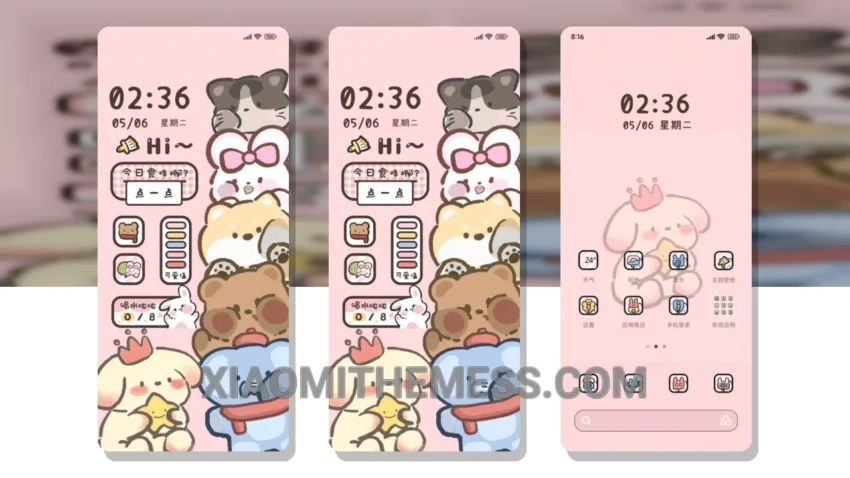
Dark mode is my jam. I mean, who needs bright, harsh lights when you can have sleek, AMOLED pure black theme goodness? The Stacked Fun Zoo theme is a great example of this, with its dark, muted tones and elegant design.
This theme is fully compatible with HyperOS, MIUI 12, MIUI 13, and MIUI 14, so you can enjoy it on your Xiaomi or Redmi device without any issues. The theme is also relatively lightweight, weighing in at around 19.32 MB, which is a plus for those who want to save space on their device.
One of the best things about the Stacked Fun Zoo theme is its battery saver UI, which helps reduce eye strain and conserve battery life. The theme also features 120Hz smooth animations, making for a seamless and lag-free experience.
In terms of customization, the Stacked Fun Zoo theme offers a range of options, including custom boot animation, AOD custom themes, and icon pack integration. You can also customize the volume panel and enjoy a clean interface with advanced widgets and an interactive lockscreen.
To be honest, I’m really impressed with the Stacked Fun Zoo theme. The only downside is that it may not be suitable for everyone, as some users may find the dark mode overwhelming or difficult to navigate. However, for those who love the aesthetic of dark mode, this theme is definitely worth checking out.
In my testing, I found the Stacked Fun Zoo theme to be fast, responsive, and free of any major issues. The theme is also easy to apply, with clear instructions provided by the developer. Overall, I’d highly recommend the Stacked Fun Zoo theme to anyone looking for a sleek, modern, and customizable theme for their Xiaomi or Redmi device.
Theme Information
🛠️ How to Install This MTZ Theme
- Download the MTZ file to your device.
- Open the official Themes app and go to your profile.
- Import & Apply the downloaded file.