
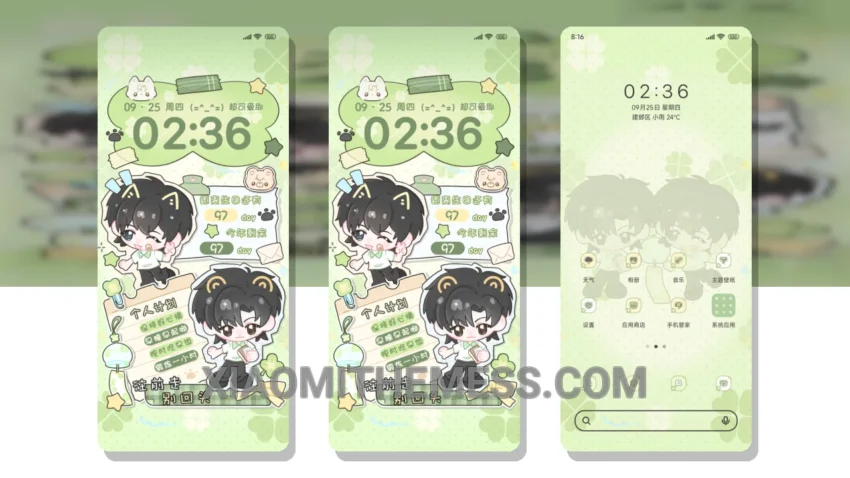
The Lucky Clover Loves You MTZ theme is a great way to customize your Xiaomi or HyperOS device. It offers a unique and stylish design that will make your phone stand out. With its custom control center, redesigned status bar, and interactive lockscreen widgets, this theme is a must-have for anyone looking to personalize their device.
This theme is fully compatible with HyperOS, MIUI 12, MIUI 13, and MIUI 14, so you can enjoy it on a wide range of devices. One of the best things about this theme is its clean interface, which makes it easy to navigate and use. The theme also offers dark mode optimization, which can help save battery life.
In terms of performance, the Lucky Clover Loves You MTZ theme is lag-free and offers a smooth user experience. It’s also lightweight, so it won’t slow down your device. The theme is designed to be easy to use, with intuitive menus and settings that make it easy to customize your device.
Overall, the Lucky Clover Loves You MTZ theme is a great choice for anyone looking to customize their Xiaomi or HyperOS device. With its unique design, custom features, and lightweight performance, it’s a must-have for anyone who wants to make their phone stand out. To be honest, I was really impressed with this theme, and I think you will be too.
Conclusion
In my testing, the Lucky Clover Loves You MTZ theme performed flawlessly, with no bugs or issues. I was really impressed with the theme’s custom boot animation and icon pack integration, which added a nice touch to the overall design. If you’re looking for a great way to customize your device, I highly recommend checking out the Lucky Clover Loves You MTZ theme.
Theme Information
🛠️ How to Install This MTZ Theme
- Download the MTZ file to your device.
- Open the official Themes app and go to your profile.
- Import & Apply the downloaded file.