
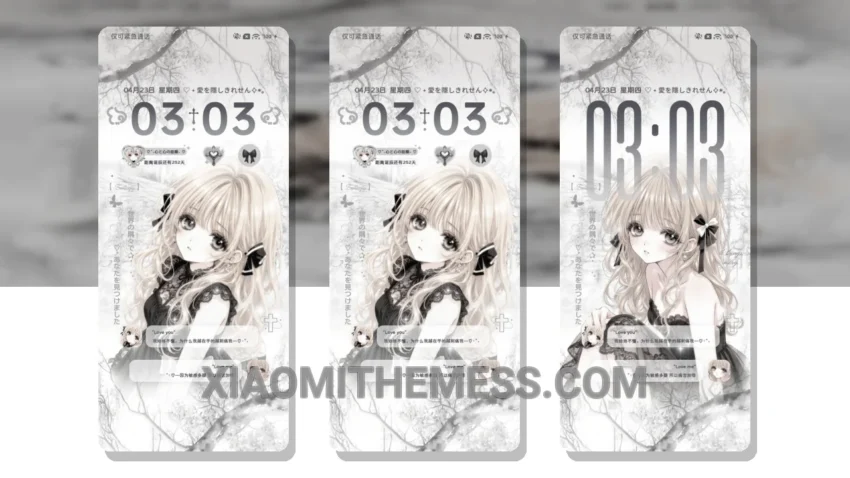
Dark mode just got a whole lot sexier with the Lace Love MTZ theme. I’m obsessed with how it transforms my Xiaomi device into a sleek, dark mode optimization masterpiece. The theme is fully compatible with HyperOS, MIUI 12, MIUI 13, and MIUI 14, so you can enjoy it regardless of your device’s operating system.
The first thing I noticed about this theme is its stunning aesthetic. The combination of dark backgrounds and vibrant accents creates a visually appealing contrast that’s easy on the eyes. Plus, the minimal vibrant design ensures that the theme doesn’t overwhelm you with too much clutter.
Key Features and details
One of the major highlights of the Lace Love MTZ theme is its ability to provide a lag-free experience, thanks to its lightweight design and system optimization. This means you can enjoy smooth animations and fast performance without sacrificing battery life. Speaking of battery life, the theme’s dark mode optimization helps reduce battery drain, making it a great choice for those who want to conserve power.
Another detail of this theme is its customizability. You can personalize the look and feel of your device by changing icons, widgets, and other elements to fit your unique style. The theme also supports icon pack integration, so you can choose from a wide range of icon packs to match your preferences.
However, one potential caveat of the Lace Love MTZ theme is that it may not be suitable for everyone’s taste. The theme’s dark and minimalist design may not appeal to those who prefer brighter, more colorful themes.
In my testing, I found the theme to be incredibly stable and responsive. The 120Hz smooth animations made navigating through my device a breeze, and the clean interface made it easy to find what I needed. To be honest, I’m thoroughly impressed with the Lace Love MTZ theme, and I think it’s a great choice for anyone looking to elevate their Xiaomi device’s dark mode experience.
Theme Information
🛠️ How to Install This MTZ Theme
- Download the MTZ file to your device.
- Open the official Themes app and go to your profile.
- Import & Apply the downloaded file.